Продолжить стринг

Вы можете задать значение Расстояние расширения по умолчанию в параметрах Визекс:
- Нажмите вкладку Проект, чтобы открыть меню.
- Нажмите на вкладку Редактор стрингов в форме Опции проекта | Визекс.
Значение расстояния расширения можно изменить в форме инструмента вместе с направлением и другими параметрами.
На вкладке Проектирование, в группе Редактирование:
-
Нажмите инструмент Расширить стринг на вкладке Проектирование, в группе Редактирование.
-
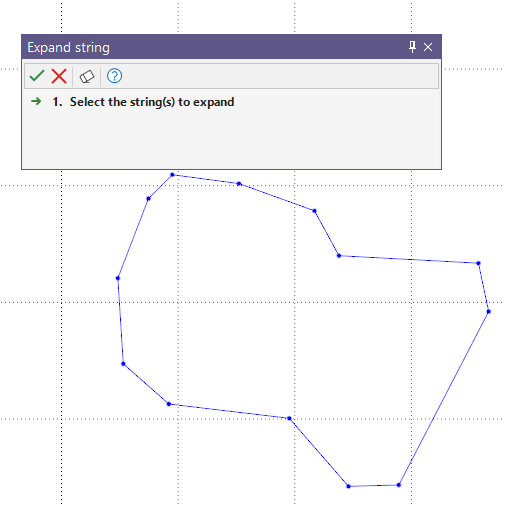
Если стринги, которые вы намерены расширить, еще не выбраны, на экране появится сообщение с просьбой произвести выбор. Поддерживается выбор части стринга.
-
Нажмите Принять в Ассистенте выбора.
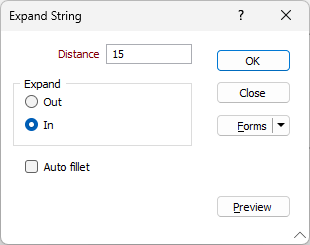
Откроется форма Расширить стринг.
-
Введите значение Расстояние для расширения в соответствующее поле.
-
Выберите, следует ли Расширять наружу или Внутрь от выбранного стринга.
-
При необходимости включите опцию Авто-скругление.
Опция Авто-скругление, применяет любой радиус скругления, необходимый для определения дуги кривой. Острые углы автоматически сглаживаются, поэтому в некоторых случаях может быть предпочтительно отключить эту опцию.
-
Вы можете нажать кнопку Предварительный просмотр, чтобы отобразить предварительный просмотр расширения.
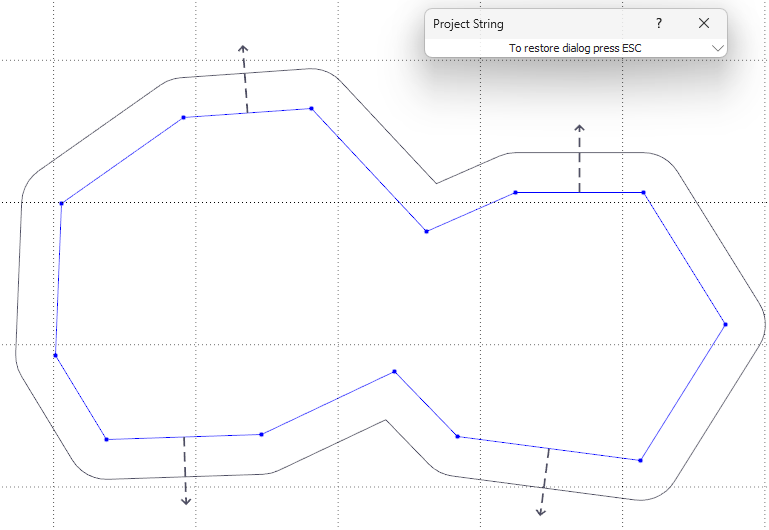
Нажатие кнопки Предварительный просмотр свернет форму «Стринг» и отобразит предварительный просмотр направления для настроенной проекции:
-
Нажмите Esc, чтобы закрыть предварительный просмотр, и
-
нажмите OK, чтобы расширить стринг на указанное расстояние в заданном направлении.
-