Staging
Use the Design > Staging tab to specify parameters for staging the development of the mine. Staging can be defined by ranges of revenue adjustment factors, with each stage subject to being of a minimum mass or volume.
Generate Ultimate Pit (RAF = 1.0)
When this option is selected, the ultimate pit is generated for a revenue adjustment factor equal to 1.0.
Generate Nested Pits for Simple RAF Range
When this option is selected, a series Maximum number of nested pits of equally-spaced revenue adjustment factors between 0 and the specified Maximum Revenue Adjustment Factor is generated.
A nested pit is generated for each revenue adjustment factor.
This is equivalent to selecting Generate Nested Pits for Custom RAF Ranges with: From = Increment = ( Maximum Revenue Adjustment Factor / Maximum number of nested pits ) To = Maximum Revenue Adjustment Factor.
Generate Nested Pits for Custom RAF Ranges
When this option is selected: Incremental designs will be produced for each value of the stage parameter in the range specified for the stage. The selection and application of the stage parameters varies in accordance with the setting of Mine | Definition | Model | Block Model >Optimisation Value:
| … > Optimisation Value | Stage Parameter | Application of Stage Parameter |
|---|---|---|
| Calculate from element revenues and costs | Revenue Adjustment Factor | Scales revenues, and costs remain unchanged. |
| Use value from field | Revenue Adjustment Factor | Since it is not possible to differentiate revenues from costs, scales positive values, and negative values remain unchanged. |
The heading for the second column in the Stage Generation grid will be changed to reflect the stage parameter in use.
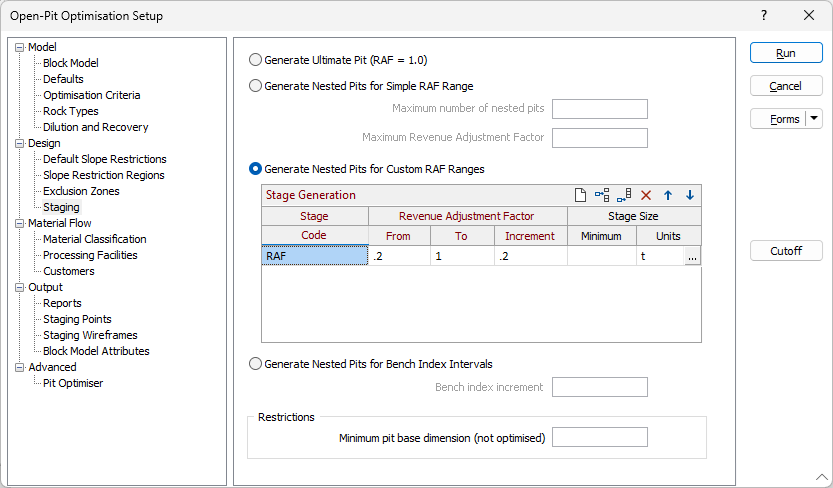
Stage Generation
Specify the following settings for each stage.
Stage Code
Specify the base code to be used to identify the stage.
Stage increments are named by appending the base code for the stage to the number of the increment in the format {stageCode}-{incrementNo}.
Stage Parameter
Specify the range of stage parameter values for which stage increments are to be generated, and the amount by which the value should be changed between each stage.
The heading for this column will be changed to reflect the stage parameter in use, as determined by the setting of Mine | Definition | Model | Block Model >Optimisation Value. See the table above.
From
Specify the lowest stage parameter value for which pits are to be included in the stage.
To
Specify the highest stage parameter value for which pits are to be included in the stage.
Increment
Specify the amount by which the parameter value is to be increased in each increment between the From and To values.
Minimum Stage Size
Specify the minimum mass or volume to be accepted for each increment of each stage.
Example: If Generate Nested Pits for Custom RAF Ranges is selected and the following stage generation parameters are specified:
| Stage Code | From | To | Increment | Minimum Stage Size |
|---|---|---|---|---|
| InnerCore | 0.05 | 0.50 | 0.05 | 20 000 |
| Outer | 0.60 | 1.00 | 0.10 | 30 000 |
Stages will be generated for each increment in the revenue adjustment factor as follows:
| Stage Increment | Stage Parameter | Minimum Size |
|---|---|---|
| InnerCore-1 | 0.05 | 20 000 |
| InnerCore-2 | 0.10 | 20 000 |
| InnerCore-3 | 0.15 | 20 000 |
| InnerCore-4 | 0.20 | 20 000 |
| InnerCore-5 | 0.25 | 20 000 |
| InnerCore-6 | 0.30 | 20 000 |
| InnerCore-7 | 0.35 | 20 000 |
| InnerCore-8 | 0.40 | 20 000 |
| InnerCore-9 | 0.45 | 20 000 |
| InnerCore-10 | 0.50 | 20 000 |
| Outer-1 | 0.60 | 30 000 |
| Outer-2 | 0.70 | 30 000 |
| Outer-3 | 0.80 | 30 000 |
| Outer-4 | 0.90 | 30 000 |
| Outer-5 | 1.00 | 30 000 |
For each stage increment, the optimum pit layout will be determined for the corresponding stage parameter and, if it has sufficient mass (or volume), the corresponding pits will be assigned to that increment. If not, the increment will be discarded and the blocks that were included in the pits will remain available for inclusion in the next increment.
Click the ellipsis in the Units field to select a Volume, Mass or Custom Stage Size unit of measurement.
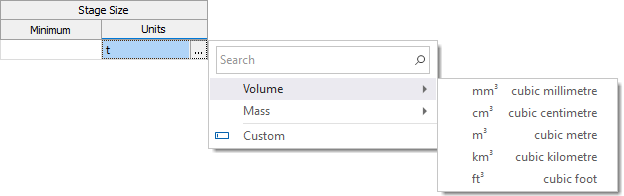
If you select Custom, you can use an expression to define the unit of measurement for the Stage Size.
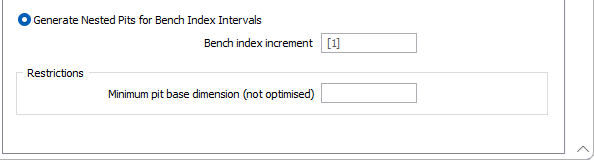
Generate Nested Pits for Bench Index Intervals
When this option is selected: Proceeding from the top of the model down and incrementing the layer (bench) index by the number specified in Bench index increment, the optimiser is run with RAF = 1.0 for each cumulative set of benches to derive the optimum pit for each interval of benches.
For example, if Bench index increment = 2, optimum pits are created for the following sets of benches:{1, 2}{1, 2, 3, 4}{1, 2, 3, 4, 5, 6}{1, 2, 3, 4, 5, 6, 7, 8}…
Since this will prevent material in excluded lower benches from supporting the mining of material in higher benches, pits so affected will not form until the lowest required bench is reached.
Restrictions
Minimum pit base dimension (not optimised)
Use this input to enter the minimum dimension to be accepted at the base of a nested pit. The Pit Optimiser uses the value in post-processing each pit after the optimisation phase has been completed.