Creating an Unlevelled Schedule
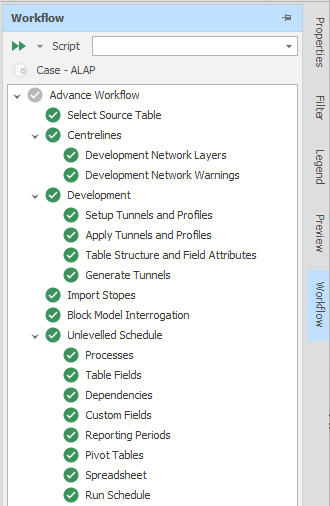
A run-through of the steps in the Advance Default Workflow is a two-phase process:
-
Phase One: Creating an Unlevelled Schedule (see below)
-
Phase Two: Levelling an Unlevelled Schedule
An "unlevelled" schedule" is a task-driven schedule which focuses on a physicals’ profile of the deposit to ensure that project value is maximised irrespective of equipment availability and other resource constraints. The objectives of having unlevelled processes turned on are as follows:
-
Ensure that schedule activities are linked correctly;
-
Don’t need to worry about setting up equipment in the early stages of the model build;
-
Understand maximum mine outputs based on a sequence only schedule
-
Build ALAP (as late as possible) in entire processes or specific activities. For example, the user can get insights on the minimum development requirement to achieve a specific production profile.
-
Project activities such as shaft or crusher construction that are not purely equipment driven can be simplified with a single unlevelled default rate (e.g., default task rate = 2 (metres per day).
When Processes are setup, an "Unlevelled" check box is used to determine whether the tasks in a process should be treated as unlevelled. Unlevelled tasks do not get worked on by conventional equipment. Instead, it is guaranteed that they will always be worked on as soon as they are ready (when the ASAP Range is set to all *).
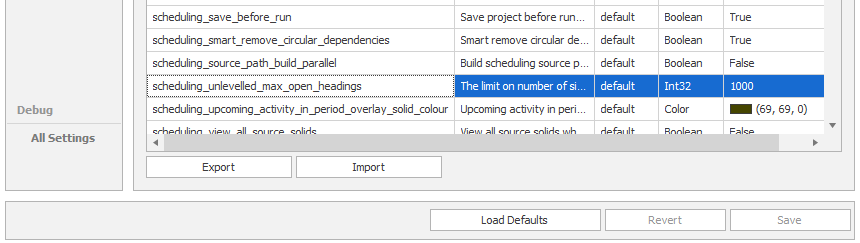
Note: Unlevelled scheduling with an excessive number of simultaneous open headings may result in long computation times. A limit on the number of open headings is set by a scheduling_unlevelled_max_open_headings user setting in All Settings.
When this limit is reached, the system throws a scheduling exception to prevent further processing, ensuring better performance. The schedule will not run unless the limit is adjusted or more dependencies are added.