Adjust Drillhole Lengths
It may be necessary to apply under-drilling or over-drilling to certain holes.
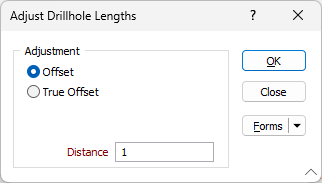
The Adjust Drillhole Lengths tool allows adjustment using either a standard method or a True Offset method. The standard method applies the specified distance by simply extending or retracting along the hole length. The true offset method creates a temporary line by offsetting the ring boundary perpendicular to the drillholes, using the specified distance. The holes are then extended or trimmed to the temporary line segment.
To shorten or lengthen holes:
- Select the ring you want to edit. On the Mining | Ring Design tab, in the Edit group, click Edit Ring to enter Edit Ring mode:

- Select the holes you want to adjust (use the mouse with the CTRL key to select multiple holes).
- On the Mining | Ring Design tab, in the Drillhole group, click Adjust Drillhole Lengths:

If no holes are selected, you will be prompted to select the holes you want to adjust.
- Choose whether to adjust the lengths of the selected holes using either the standard Offset method or the True Offset method.
- Specify a Distance by which the length of the selected holes will be adjusted and click OK. Setting a negative value for the offset distance will shorten the selected holes.
Note: The length of the holes can also be changed via the Properties window.