Micromine
A Micromine Cloud Licence is a network-style licence hosted in the cloud on Nexus. Micromine Nexus is a web-based, enterprise-level file management solution which seamlessly integrates with Micromine applications and Open API applications to provide secure data storage, file versioning and access control, plus flexible tools to facilitate the governance of corporate-wide business processes.
Select Micromine from the Licence System drop-down to configure a licence from the Micromine Cloud Licensing Service (MCLS).
Use the Licence Options > Cloud Licences tab to manage the cloud licences that have been assigned at your workplace.
To view and access the Cloud licences for Spry, you must sign in with your Micromine ID. For further information on signing in, see: Nexus Home
If cloud licences are available and you have the necessary permissions, you can manage those licences. By default, expired licences are not shown in the grid. Un-tick the Hide expired licences check box if you want to see them.
When you select a licence in the grid, the details of that licence are shown.
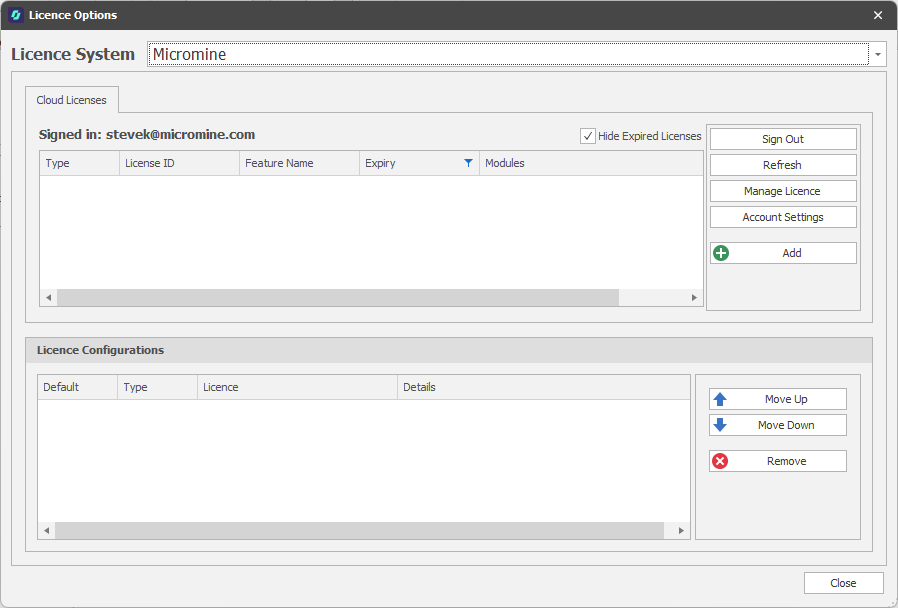
Micromine Cloud Licensing
Manage Licence
Click Manage Licence to open the Nexus Home - Manage Licences page.

Account Settings
Click Account Settings to open the Nexus Home - User Profile page.
For more detailed information about cloud licensing, see Cloud Licensing
For information on the technical requirements for Cloud Licensing, see: Technical Requirements
For answers to a number of frequently asked questions, see: Cloud Licensing: FAQs