Replay
On the Pitram tab, in the Replay group:
-
Click Replay Time Interval to select an up to 12 hour interval of movement to play back.

-
Click Seek Beginning to navigate to the starting point of the replay interval.

-
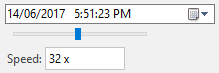
Click Rewind to step backwards through the current replay interval. Each click of the button will decrease the playback speed (increasing rewind speed). The current Speed is displayed in the field provided.

-
Click Start to begin the selected replay interval

-
Click Pause to pause playback of the selected replay interval. The interval is not closed.

-
Click Stop to stop playback of the selected replay interval and return to live data. The interval is closed and must be run again with Replay Time Interval if required.

-
Click Fast Forward to step forward through the current replay interval. Each click of the button will increase the playback speed. The current Speed is displayed in the field provided.

-
Click Seek End to navigate to the end of the current replay interval

-
Use the Slider to navigate backwards and forwards through the current replay interval. The current position is displayed in the Date/Time field above.