

Record Removal
Use the Record Removal step to exclude solids from the scheduling inventory.
You may select individual blocks (left click or <CTRL> + left click) or box select many or the whole level (selected blocks will be shown in yellow).
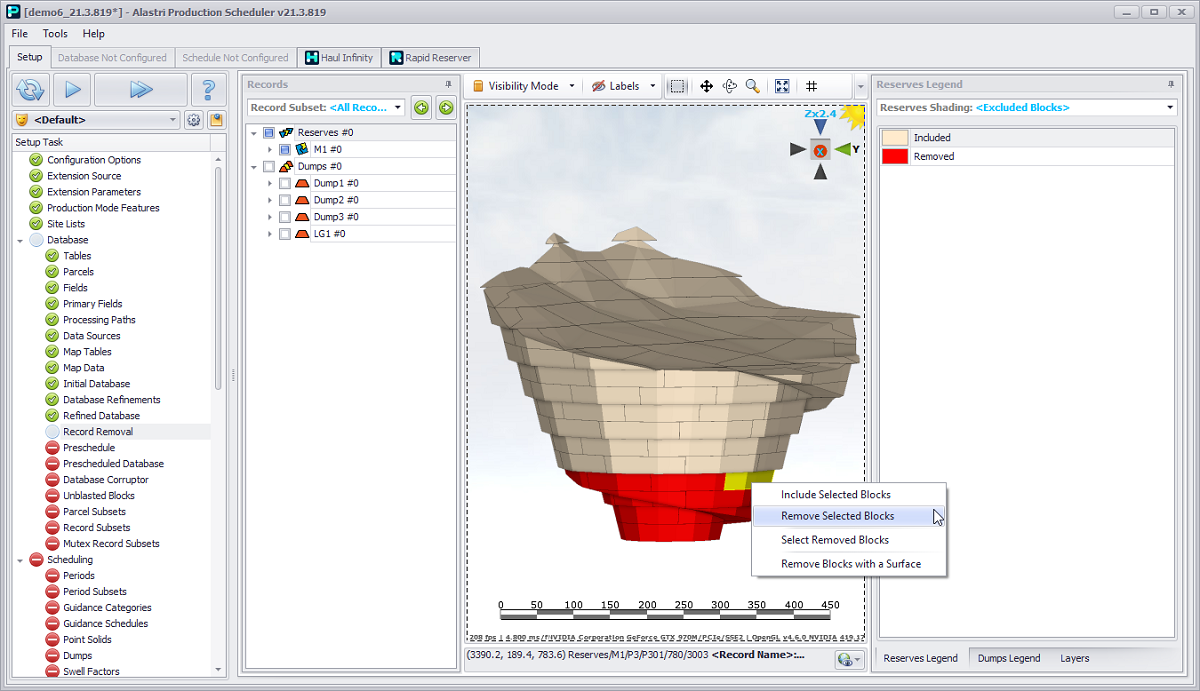
Optionally remove solids from the scheduling inventory
In this step, the block is flagged for removal (red). When run to next step is selected, the flagged blocks have been removed.
In this step blocks can be completely removed.
In the next step (Preschedule), blocks can be set as 100% mined, however the blocks will remain in the reserves as empty solids.
Use Reserves Shadings and Dumps Shadings fields drop-downs in the Reserves Legend and Dumps Legend tabs, accordingly, to select preconfigured shadings pattern to facilitate Reserves and Dumps view.
For more information on the use of the Layers tab, see: Layers/Overlays Panel
For a description of the toolbar buttons above the viewport, see: Toolbar