Sync Manager
The Sync Manager component of Data Transfer is designed to synchronise data between a Central Geobank system and a Subsidiary system on a field device or separate mining or exploration site, with filtering to control subsidiary data.
Before the Sync Manager can be used to create Sync Operations, the Central and Subsidiary systems must be correctly configured. For information on setting up the synchronisation process, see Synchronisation Setup.
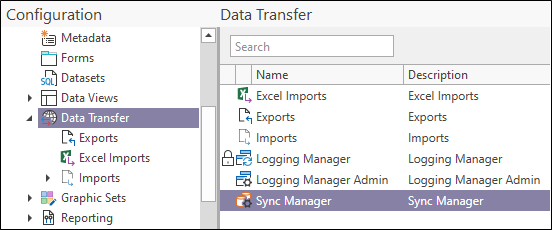
To open the Sync Manager from the Central system,
-
In the Configuration Manager, under Data Transfer, double click the Sync Manager option.
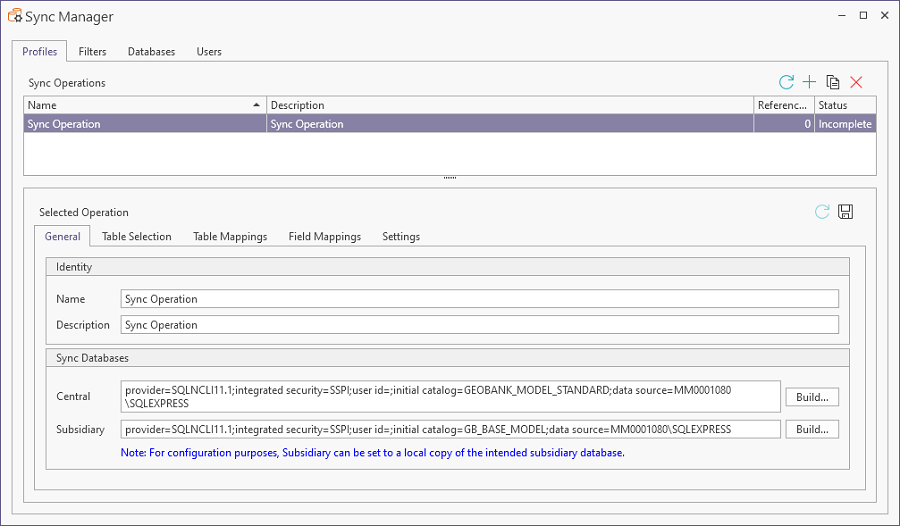
The Sync Manager contains the following tabs; and information can be found on each from the link:
Details on the process for creating profiles is contained in Create Sync Manager Operations.
Information on creating sync filters for use with your profiles is contained in Create a Sync Filter.
For details on synchronising the data between your Central and Subsidiary systems, see Syncing Your Data.
For tips on mitigating the risks associated with the underlying technology used for data synchronisation, see Working with Microsoft® Sync Framework.