Profiles
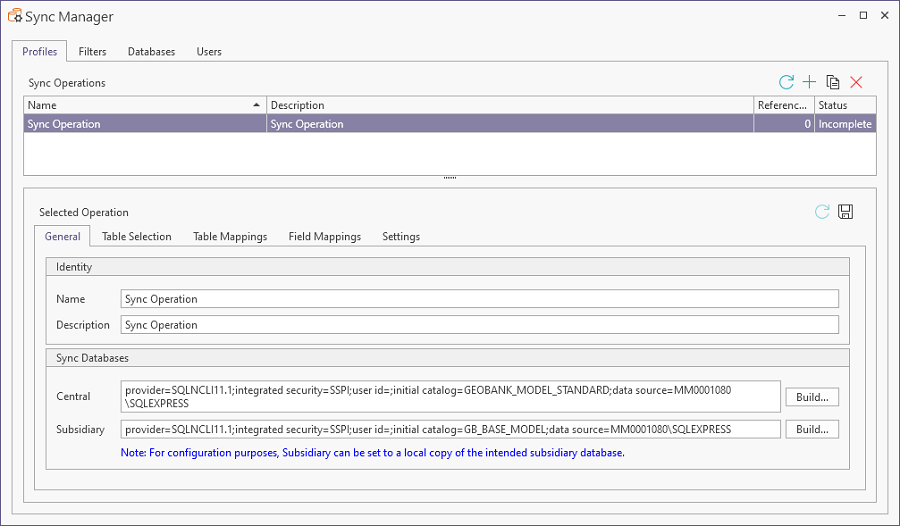
The Profiles tab of the Sync Manager displays the details of all the Sync Operations that have been configured.
Note: As Profiles are created in the Sync Manager, they should be created and configured in the Central system for synchronisation.
The Sync Operations grid in the Profiles tab of the Sync Manager displays the Name and Description for each operation, as well as a Reference Count and the current Status for the operation.
The Selected Operation section of the Profiles tab contains a number of separate tabs:
-
General - displays the Name and Description for a selected operation in the Identity grid, as well as the Central and Subsidiary databases for synchronisation in the Sync Databases grid.
-
Table Selection - Used to select the available tables from the databases for synchronisation.
-
Table Mappings - Used to map the selected tables from the Subsidiary database to the equivalent Central database.
-
Field Mappings - Used to map fields from the mapped tables to fields in the Central database.
-
Settings - With the Settings tab, you can select the Sync Direction for the mapped tables, as well as apply an Upload Central to Subsidiary / Subsidiary to Central filter.
Details on the tabs in the Selected Operations section, along with the process for creating operations is contained in Create Sync Manager Operations.