Pitram Data Acquisition
The Data Acquisition application is used to record and process all events related to the running of a mine, as they happen. This provides an instant snapshot of equipment locations and status, personnel allocations and production measures for the shift to date.
Data Acquisition is usually the realm of the Control Room Operator on site. This person is responsible for ensuring that all equipment, location, and personnel activities are accurately recorded in the Pitram database. This information includes production measures (tonnes hauled, drill bits used, etc.) and many other measures that are quantified on site. Each event is stored in the Pitram database at the time it occurred.
Note: While you can manually start and end a shift in Data Acquisition, a shift does not depend on Data Acquisition in order to run. Shift start and end times can be configured automatically as part of the Pitram server configuration.
There may be a short delay while the application is initialised and loaded. The Data Acquisition window comprises a number of tabbed panes, a menu bar, a toolbar, and a status bar. There are four main areas:
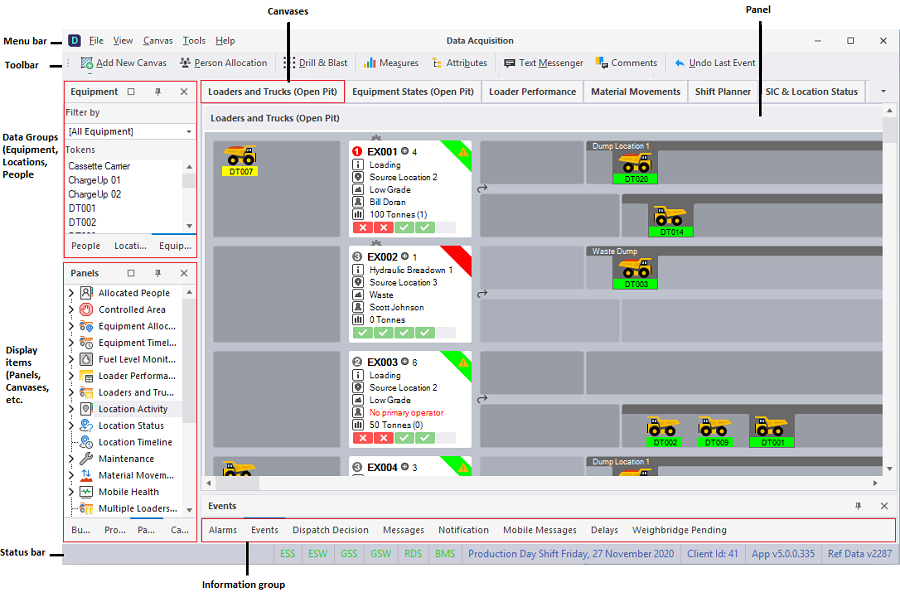
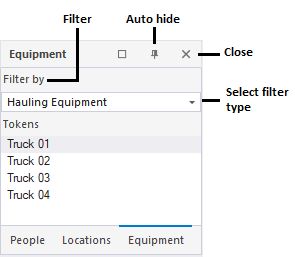
| Data Groups | Upper left is the default location for a pane which contain the (Equipment, Locations, People) data groups that are active during the shift. You can use the Tools | Configure Token Navigators menu option to group data by a chosen attribute, for example, group Equipment by their Model attribute. See: Attribute Grouping |
|
|
| Display pane | Lower left is the default location for a pane that contain the display elements (panels and canvases) that you have configured. |
| Canvases | Upper right is the default location for the Canvases you have configured. A canvas is a view comprising one or more panels. |
| Information | Lower right is the default location for Viewing critical Information. This area shows the events recorded during the shift, and any messages, validation errors, or alarms raised during the shift. |
These are the default locations for the main areas of the user interface. However, you have the flexibility to close windows, temporarily hide windows, or move windows around.
Most of the data recorded by Data Acquisition is entered and displayed in a panel. There are three different types of panel:
- Primary and Secondary Equipment: In most cases, these will be Loaders (Primary) and Trucks (Secondary), but the same type of panel can be used to represent any primary-secondary equipment relationship, for example to track the location of tool carrier (IT) attachments.
- Equipment with an Associated Measure: Drills are the most common example. Their status, location, total length drilled (for this shift) and drilling rate are also displayed. Separate panels of this type are used to handle groups of equipment that have a common set of associated measures.
- Equipment without an Associated Measure: Typically these are Service Vehicles, such as graders, dozers, and water carts.
Typical events that are recorded by Data Acquisition include:
- Equipment States: Any changes in equipment states are recorded. States are categorised into Operating, Standby, Planned Loss, Opportune Maintenance and Break Down Loss, with each category broken out to give the level of detail required for the site.
- Locations: Locations are recorded against equipment to determine where material is being mined, where material is dumped, and where equipment is at the end of the shift or start of a new shift. Locations can also have a status associated with them, for example bogging, bolting or charging.
- Movements: Movements are usually recorded by logging Truck Dumps or Loader Buckets. These events use the Location information to determine the Source and Destination as well as the Material type.
- Personnel: Employee activities and allocation to equipment are recorded and historical data can be used to determine productiveness for the individual on each type of equipment, last operated date, time-sheet details, training details, leave, etc.
- Measures: Data can be captured for measures relating to fuel, drill holes and metres drilled, bolts (and other consumables), advance, rail events, equipment hour meter readings, etc. These can be used for reporting total usage, consumption rates, drill rates, etc.
Other data can be recorded via the main menu or right-click menu. This include events such as:
-
Shift Start
-
Shift End
-
Shift stoppages (Lunch, Meetings, etc.)
-
Personnel allocations and activities
-
Location status
-
Location measures
Shift to Date History
A number of standard summary panels can be configured as part of the Data Acquisition display. For instance, there will typically be a panel displaying material movements grouped by destination. Other panels might be configured to show:
- Events
- Drilling Equipment
- Loading Equipment
- Trucking Equipment
- Non Production Equipment
- Location Status
View-Only Mode
The Data Acquisition application can be run in “view only” mode from any PC located on the network. This mode does not allow user input.