

Records Panel
The Records panel is located on the left-hand side of the Viewport Display. This panel contains a tree structure listing all levels of records in a certain order.
Level Tree Structure
-
A tree structure (or hierarchy) of levels/records is a list of all levels, arranged by parent and child records. In Alastri applications, such a structure displays a hierarchy of mine parts, as following: Reserves - Mine - Pit - Phase - Bench - Blast - Flitch - Solid, and Dumps - Dump - Lift - Solid.
-
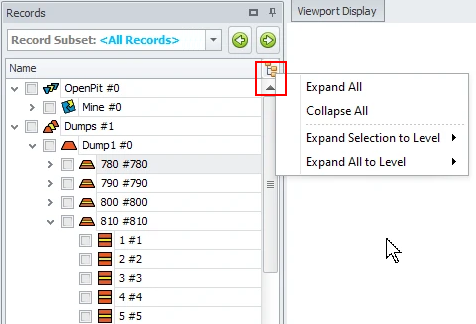
Click the button directly above the scroll bar to see available Expand/Collapse options.
-
You can expand or collapse all the levels.
-
Expand selection or all records to a certain level, such as Reserves/Dumps - Mine/Dump - Pit/Lift - Stage - Bench.
-
Select the required mining element from the tree level hierarchy. You can select both individual elements and entire levels.
-
Double click on a record to zoom in on that record in the Viewport.
-
-
By checking a level it will display in the Viewport Display.
-
The Graphics View mode button affects how data is displayed in the viewport. Click to toggle between Show All to show the entire mine at that time in the schedule, or Selected to display the blasts/benches/stages selected in the Records Panel.

Note that in “Selected” mode, Animation cannot be played.
-
You may also select the whole Reserve/Mine/Pit/Stage/Bench to display or selected solids using <CTRL> and <Shift> hotkeys.
-
Data for the selected level will be automatically shown in the Data Panel.
It is possible to quickly expand/collapse the level structure:
Record Subsets
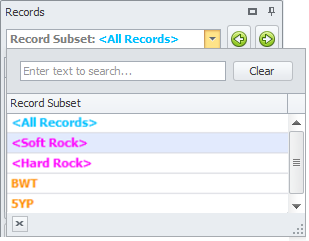
Use the Record Subset drop-down to display certain groups of records.
Record Subsets are configured in the Setup Task > Scheduling > Record Subsets setup step. Record Subsets may include groups of blocks based on:
-
fleet: Autonomous or Crewed;
-
certain mining RL: Below or Above water level, Lower or Higher benches;
-
source blocks for the specific destination;
-
source blocks for the specific phases, or of a certain volume;
-
blocks to be mined/drilled within specific periods, etc.
Custom record subsets will appear in bold orange. The information in the Data Panel as well as in the Viewport Display will be automatically updated.
-
Use the green arrows to navigate to the Previous or Next Subset.
-
To facilitate searching through the list of available records, the Search tool is provided.
-
Record Subsets shown in bold pink are scripted.