Shotcrete Configuration
Shotcreting is a process used in underground mining to apply concrete or mortar onto surfaces, such as rock walls, for stabilisation and support. Materials (additives) are mixed at a batch plant in a Mixing unit which is then attached to a Spraying unit for spraying to a location. Expired material (waste) is dumped to a location that can be a specified default or a user-selected location.
The shotcrete process in underground mining involves several key pieces of equipment to ensure efficient application and safety:
-
Agitator Trucks (agitator, agitruck)
-
Concrete Mixers (mixer, transmixer)
-
Spraymecs (sprayer)
-
Slickline (pipe)
In Pitram, Equipment tokens can be set up as Mixers or Sprayers to perform these actions, as well as Batch Plants where mixers are loaded with material. Locations can be sprayed or dumped to.
Different types of materials and additives are used in the shotcrete process to enhance performance and adapt to specific conditions:
-
Shotcrete
-
Fibercrete (Fiber-Reinforced Shotcrete)
The shotcrete material is prepared at an onsite batch plant with different types of receipts, based on requirements. A recipe or mix number is an attribute of a particular batch/load and should be inherited down to sprayed location.
In Pitram you can configure Material tokens and designate them as shotcrete with an attribute. These material tokens can be added to the Shotcrete panel configuration in Data Acquisition as valid materials.
Configured Reference data can be used in conjunction with a dedicated panel in Data Acquisition and a view in Event Editor to capture and analyse your shotcrete-related activity.
The following sections outline the required configuration to enable Shotcrete functionality in Pitram.
Reference Data
A number of attributes across multiple groups need to be deployed.
Business Model Settings
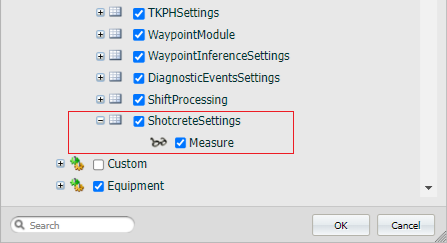
The Shotcrete Settings in the Business Model Settings group should be deployed:
-
Shotcrete Settings - The ShotcreteSettings data group was created specifically for Shotcrete functionality in Pitram v14
-
Measure - The Measure attribute determines the unit of measurement which applies to material marked as IsShotcrete in the reference data. This is a required attribute that must be set up for shotcrete functionality:
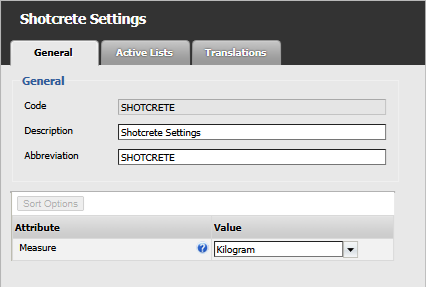
Note: When configuring the measure that will be used for shotcrete movements, it is highly recommended not to use a measure that is used in Material Management.
-
Equipment
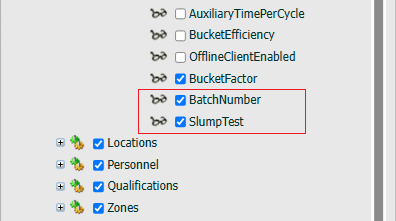
Two of the Equipment attributes were created specifically for the Shotcrete functionality in Pitram v14:
-
Batch Number - A required Text field. The BatchNumber attribute is a dynamic attribute used to identify material movements that came from the same batch of concrete produced at a batch plant.
-
Slump Test - An optional Numerical field. SlumpTest is a dynamic attribute that allows recording when a slump test was performed, for what Mixer equipment and the result. 0 = Fail, 1=Pass.
-
Model - (Required) The model of the equipment. Should be set to an Equipment Model with the Equipment Model Type of BATCHPLANT, MIXING or SPRAYING.
-
Default Location - (Required for BATCH PLANTS). This is the location of batch plant.
The Model attribute is also required:
-
Model - The required Equipment Model Data Token.
Additionally, required for Batch Plants:
-
Default Location - The DefaultLocation attribute is the location of the batch plant.
Equipment Model
In the EquipmentModel group, the following attributes will be used:
-
Valid Primary Equipment - The (optional) ValidPrimaryEquipment attribute is an Active List of Equipment data tokens
-
Cycle States Active List - The CycleStatesActiveList is the active list of Cycle Status tokens. The active list defined must include Loading, Hauling and Travelling Empty.
-
Function - (Required) Must be set to either BATCH PLANT, MIXING UNIT or SPRAYING UNIT based on the equipment.
-
Capacity - (Optional) Only needs to be configured on MIXING UNITS. The total carrying volume, in the unit of measure as configured in the ShotcreteSettings. This value is used when validating the total volume of material being moved by the MIXING UNIT.
Equipment Function
-
Equipment Function - The EquipmentFunction data token is required and should be set to either BATCH PLANT, MIXING UNIT or SPRAYING UNIT based on the shotcrete equipment
-
Capacity - The EquipmentFunction | Capacity attribute is an optional numeric value of capacity for the shotcrete equipment
-
Equipment Function Type
The shotcrete framework has introduced three new equipment function types, usually to be defined in the Equipment Function Reference Data Group.
- Batch Plant - Code: BATCHPLANT
This is the fixed equipment that produces the material
-
Mixing Unit - Code: MIXING
This is any equipment that is involved in the transport of material
-
Spraying Unit - Code: SPRAYING
This is any equipment that performs the final application of material
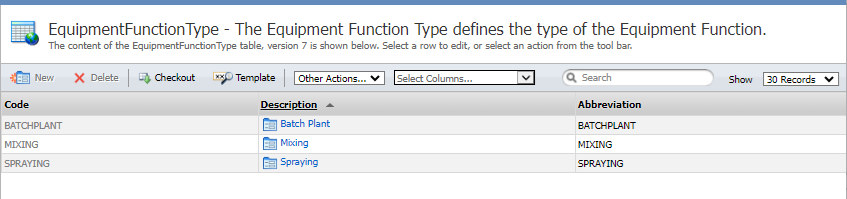
If multiple Equipment Functions of the same type are required (for example, a mobile spraying unit vs. a fixed spraying unit), then the type can be defined in the Equipment Function Type Reference Data Group and assigned to an Equipment Function using the FunctionType attribute.
Equipment Function
The above Equipment Function Types can be assigned to the EquipmentFunction token for shotcrete equipment:
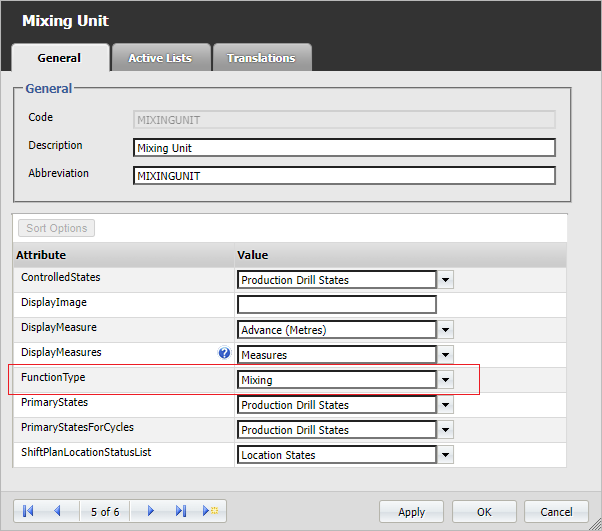
FunctionType should be set to either BATCHPLANT, MIXING or SPRAYING based on the type of equipment. This attribute only needs to be set if the name of the Equipment Function is different than a required Equipment Function. For example, configuring a SPRAYING_FIXED and SPRAYING Equipment Function will require SPRAYING_FIXED to have this attribute set to SPRAYING.
Cycle Status
Mixing and Spraying Units both require the Loading, Hauling and Travelling Empty Cycle Status tokens to be deployed.
-
LOADING - This cycle status denotes the period of the movement cycle the equipment is being loaded.
-
HAULING - This cycle status denotes the period of the movement cycle the equipment is transporting the material of the movement.
-
TRAVELLING_EMPTY - This cycle status denotes the period of the movement cycle the equipment is travelling without carrying any material.
These are the same tokens used by hauling equipment, e.g. trucks, so they do not need to be recreated if they have already been deployed.
Location
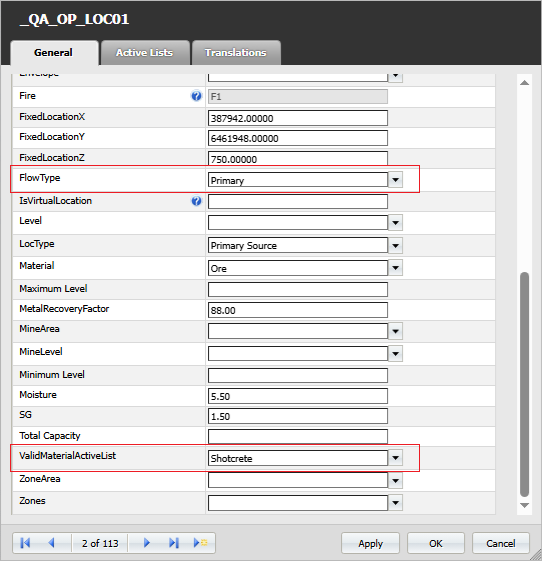
The Locations for shotcrete configuration can optionally be assigned a list of material using the ValidMaterialActiveList attribute:
-
ValidMaterialActiveList - (Optional) A list of material that are valid for the location/batch plant
-
FlowType - (Required) The Flow Type token that defines the direction of the material flow.
Material
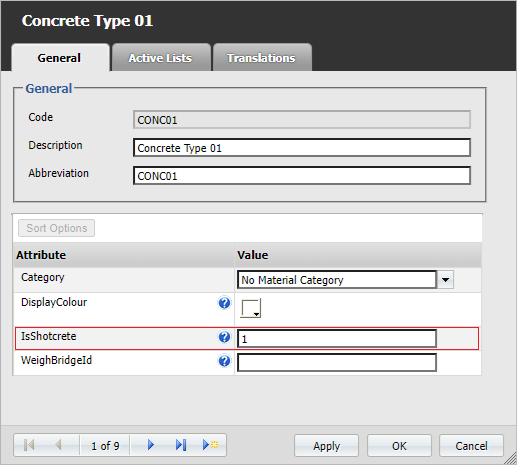
The Material token can be marked as shotcrete with the following attribute:
-
Is Shotcrete - The IsShotcrete attribute is required for a material to be used for shotcreting
Measures
The following Measure attributes are used to record shotcrete information:
-
Measure Type - The MeasureType attribute is required for shotcrete measurement
-
Movement - For sprayed material movement
-
Additive - For additives added to the material. An additive is a type of measure that is added to the concrete mix.
-
-
EquipmentMeasure - (Required) Set to 1
-
Minimum Value - The MinimumValue attribute is optional to enter a minimum value for the measure
-
Maximum Value - The MaximumValue attribute is optional to enter a maximum value for the measure
When configuration is completed, shotcrete activity data can be created and tracked using the Shotcrete Panel Panel in Data Acquisition and Shotcrete View in the Event Editor.