Deploying Default Mobile UI Configuration
In order to work with, import and export the reference data groups used for mobile UI configuration, specific data groups must be deployed. The following describes the process of deploying these groups and their related attributes.
Mobile Settings
The MobileUserInteface groups are contained in the Mobile Settings branch of the Reference Data Deployment tool. To ensure the groups are deployed, in Portal;
-
Open the Reference Edit service.
-
From the Other Actions drop down, select Deploy Reference Data.
The Reference Data Deployment dialog opens.
-
Expand the Configuration Items branch.
-
Expand the Mobile Settings branch.
-
Expand the Mobile User Interface branch.
-
Select the Mobile User Interface check box. This will select the check box for all attributes it includes - as shown:
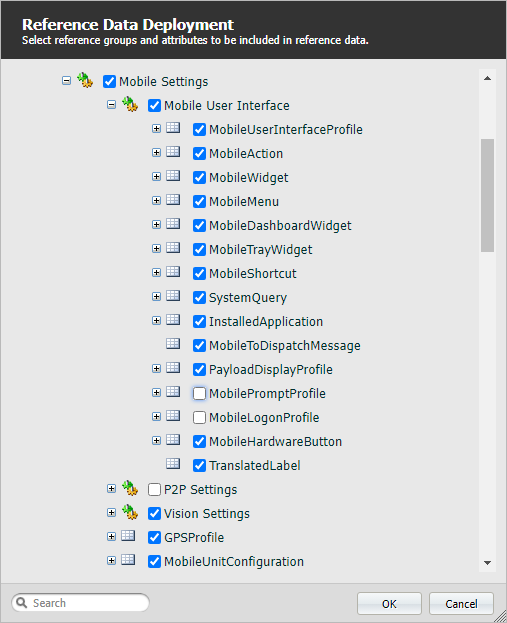
With the Mobile Settings data selected for deployment, the MobileUserInterfaceProfile attribute must be selected for two groups.
MobileUserInterfaceProfile
-
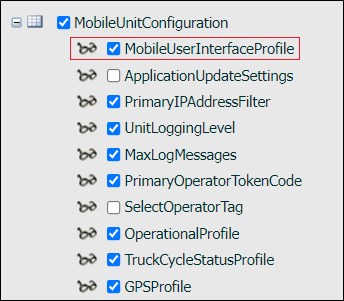
Select the check box for the MobileUserInterfaceProfile attribute in the MobileUnitConfiguration group:
-
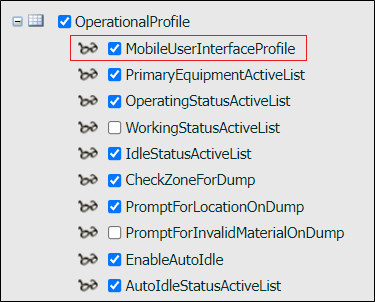
Select the check box for the MobileUserInterfaceProfile attribute in the OperationalProfile group:
When all of the relevant reference data has been selected for deployment,
-
Click OK to deploy the reference data.
Once the Mobile User Interface groups have been deployed, you will be able to load the default reference data and import mobile UI templates using the newly enabled option in Reference Edit - as outlined in Importing Default Mobile UI Configuration.
To publish the mobile UI reference data, in the Reference Edit service,
-
Click the Publish button.