Configuring Mobile Widgets
Mobile Widgets created in Pitram can be assigned to the Mobile User Interface Profiles for Pitram Mobile. They are then displayed on the Main screen of the Mobile unit to show the current value for the defined system, equipment, attribute or state.
Most widgets have a configurable OnClick action that references a MobileAction that has been configured - see Configuring Mobile Actions.
To create and configure a new mobile widget, in Reference Data,
-
Select Configuration Items | Mobile Settings | MobileWidget
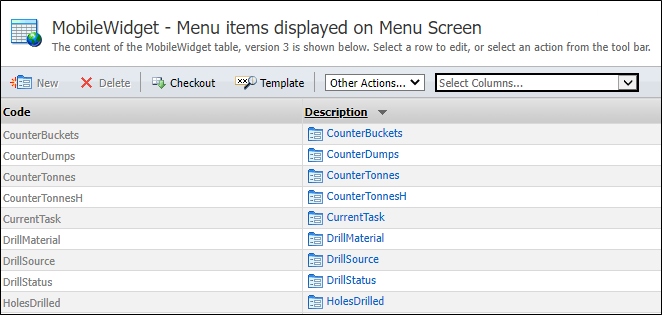
The MobileWidget configuration page opens with the configured widgets displayed.
-
Click the Checkout button in the toolbar to place the table in edit mode.
-
Click New.
The Create New MobileWidget form opens.
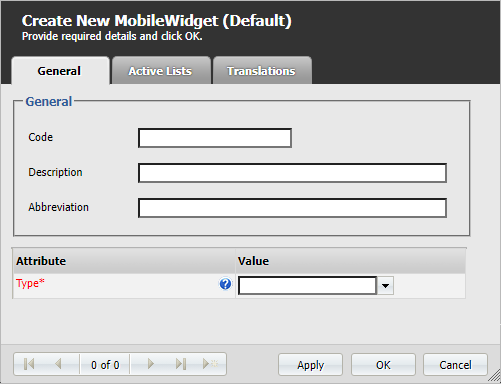
The MobileWidget contains the following attributes:
| Attribute Name | Description |
|---|---|
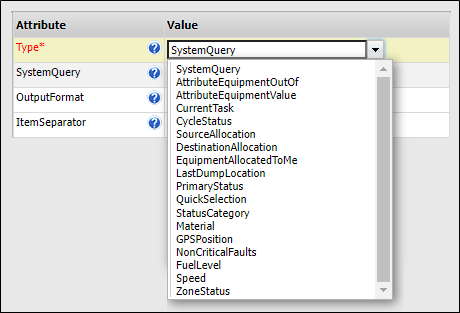
| Type |
The type for the MobileWidget. There are a wide range of available widget types supported by Pitram.
|
-
Click OK to save the new MobileWidget. The widget can now be assigned to a mobile user interface.
Information on configuring a Mobile User Interface is contained in Configuring Mobile UI Profiles.