Task Manager

The tasks you can create are limited to the Task Types selected as part of your workspace settings.
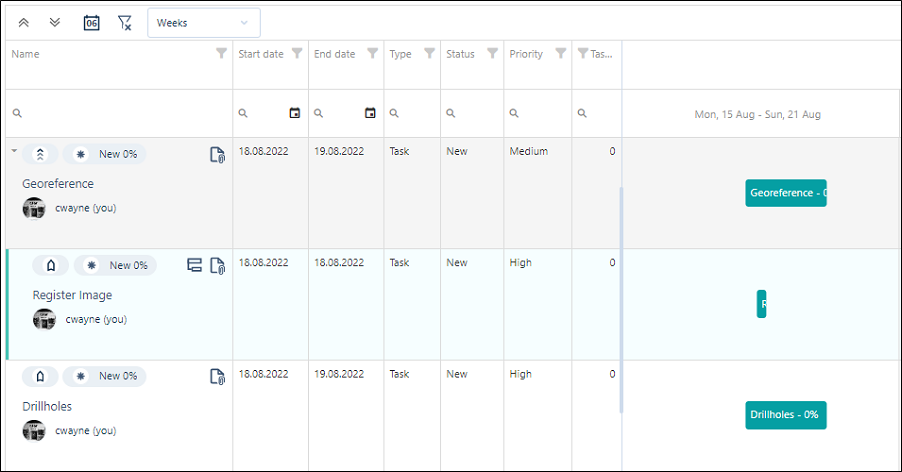
Create Task
Click to create a task and add it to the Gantt chart. See: Create Task

Alternatively, click to select a task in the Gantt chart and click Add subtask. See: Create Subtask

Duplicate Task
Click to create a copy of a selected task that can be modified to create a new, similar task. See Duplicate Task.

Delete Task
Click to delete the currently selected task. You will be prompted to confirm the deletion.

Edit Task
To edit a task, double-click on a task in the Tasks List or the Gantt Chart. See: Edit
Task Duration & Progress
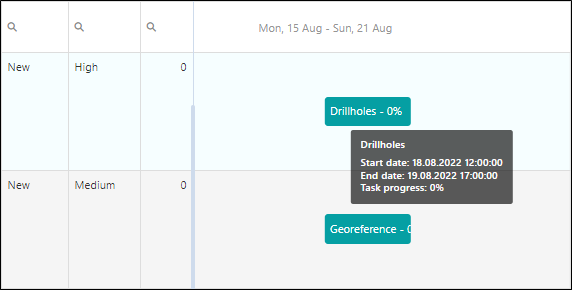
To view the duration and progress of a task, hover your mouse over the task to see a summary:
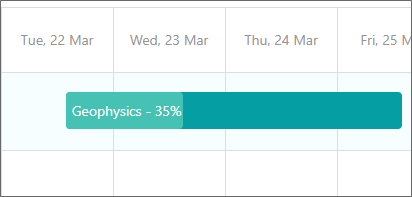
Progress is also shown on the task bars themselves:
An Example Workflow
A Block model update (task) is created by a Resource Geologist in Nexus. He or she splits this task into the following sub tasks:
-
Update drillhole database
-
Update interpretation strings and wireframes
-
Re-estimate block model
Each sub task is the responsibility of a different Nexus user:
| Task | Activities |
|---|---|
| 1. Update database | |
|
User 1 receives a notification of his or her task and downloads new drillhole data samples from Nexus (this might be in any format, for example, Excel) to a local Micromine project. In the local Micromine project, User 1 imports and validates this new data and uses the data to update an existing drillhole database. Still in the local Micromine project, User 1 uploads the updated drillhole database files to Nexus. |
|
| 2. Update strings and wireframes | |
|
User 2 receives a notification of his or her task, and downloads the updated drillhole database files from Nexus to his or her local Micromine project. User 2 performs string interpretation and creates a wireframe from them and then uploads the new wireframe to Nexus. |
|
| 3. Re-estimate the block model | |
|
The Resource Geologist receives notification that a new wireframe and assay data have been uploaded. He or she downloads those files from Nexus to his or her local Micromine project and updates a blank block model file from the new wireframe to perform a re-estimation of the block model. He or she can then close the task as complete. The owner of the block model (for example, Mine Planner, receives notification that the block model has been updated. |
|