Unfold (via Trend Model)
The unfolding (and stretching) of folded orebodies is an important requirement for many clients who want to model folded sedimentary deposits. For more information, refer to the Overview topic.

To unfold an orebody based upon the surface geometries that you have manually defined as wireframes or strings, see Manual Unfold.
For a description of flattening without stretching, refer to the Flatten topic.
Files
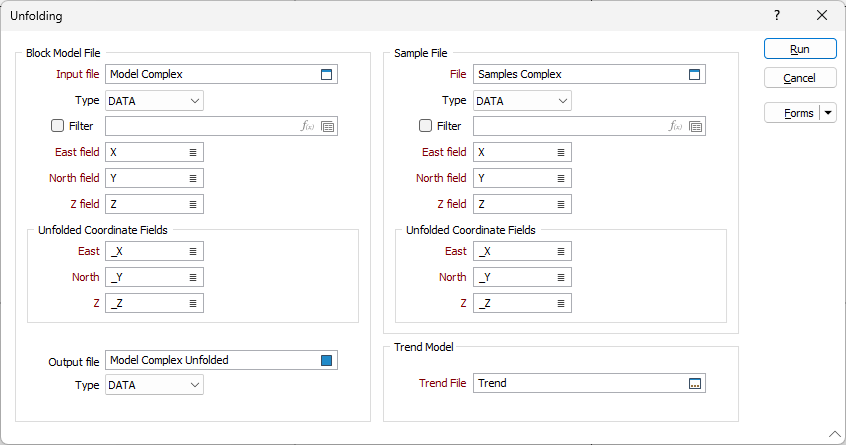
The following parameters must be specified on the Files tab of the Unfolding form:
Block Model File and Sample Files
Double-click to select the name of the block model file that will be unfolded, and the name of the Sample file that will be used as the basis for unfolding. You can also click the Pick from Vizex button to collapse the form and interactively select a layer containing the file to be inserted and return to the form.
For each file, specify the names of the fields in which the Easting, Northing, and Z coordinates are stored.
Unfolded Coordinate fields
Specify the fields in the input files that will be used to store the unfolded (true geological) coordinates.
Output File
Double-click (or Press F3) to select the name of the output file that will block model file that will be created from the Unfold process.
Trend fileYou can also click the Pick from Vizex button to collapse the form and interactively select a layer containing the file to be inserted and return to the form.
In order to calculate unfolded coordinates, a structural interpretation of the folded strata must be provided.
Double-click (or click on the Select icon) to select a structural trend model (*.mmstf) file. You can also click the Pick from Vizex button to collapse the form and interactively select a layer containing the file to be inserted and return to the form.
Structural trend files are an output of the Create Trend function on the Implicit tab, in the Structural Trend group.
Forms
Click the Forms button to select and open a saved form set, or if a form set has been loaded, save the current form set.
Run
When you have set unfolding options and specified a Wireframes or Strings input mode, click Run to begin the Flattening process.