Ограничить каркасной моделью
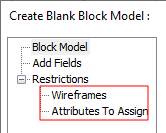
Выберите опцию Ограничить каркасной моделью для того, чтобы создать пустую модель внутри одной замкнутой каркасной модели или набора каркасных моделей. "Wireframes" and "Attributes To Assign" pages are available on the Navigation tree at the left of the Create Blank Block Model form:
Каркас
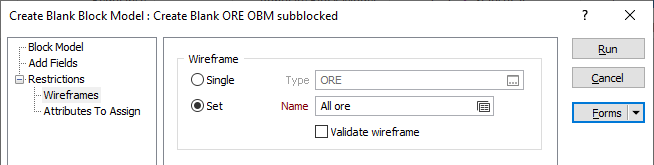
Укажите каркас или набор каркасов, который будет использован для ограничения пустой блочной модели.
Для обработки отдельного каркаса выберите опцию Один, после чего задайте Тип каркаса, а затем Имя каркаса данного типа.
Для обработки нескольких каркасов можно использовать выражения, подстановочные знаки и частичные имена в поле Имя, чтобы выбрать несколько каркасов в качестве специального набора каркасов. В меню по правой кнопке вы можете применить опцию Предварительный просмотр, чтобы проверить выражение перед его использованием для создания обновленного списка каркасов.
Чтобы обработать каркасы в предопределенном наборе каркасов, используйте опцию Набор.
Рекомендуется проверять каркасы перед их использованием в любом процессе.
Присвоить атрибуты
You can assign up to 10 wireframe attributes to the fields in the associated data file. To do this, use the Navigation tree on the left of the Create Blank Block Model form to open the Присвоить атрибуты page.
Метод присвоения
Majority Assign
This is a good option for speed and ease of use. A minimum volume factor value of 0.5 is applied based on a Union of volume factor values. Блоки со значением менее 0,5 удаляются.
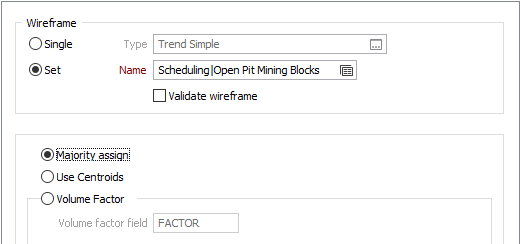
Use Centroids
The Use centroid method simply allows blocks to be assigned according to their centroids. However, in scenarios where there are millions of triangles, the speed of assignment may be very slow.
Note: For the methods above, the Assign Attribute for Blocks inputs (on the Attributes to Assign tab of the form) are not applicable. If an attribute is assigned, all blocks will be assigned the attribute.
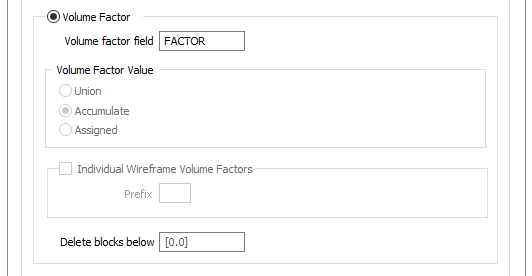
Volume Factor
If you choose to perform a Volume Factor calculation, if a block intersects with a wireframe it will be kept. The proportion of the volume (Volume Factor) that occurs inside the wireframe is recorded as a number between 0 and 1. A value of 0.65 will mean that 65% of the block is inside the wireframe.
Volume Factor field
(Optional) To write volume factor values to the block model file, specify a field name.
Volume Factor Value
When multiple wireframes are specified as inputs, choose how the volume factor values are reported when a block or part of a block falls within more than one wireframe:
| Accumulate | (Default) The sum of the volume factors from each wireframe. |
| Union | The volume factor inside the union of all wireframes. |
| Assigned | The volume factor of the wireframe the block was assigned to. |
Individual WF Volume Factors
This option allows the volume factor for each individual wireframe to be recorded. Columns containing the volume factor for each wireframe are created in the destination block model file.
The name of each column is the name of each wireframe, prefixed with the specified Prefix.
Delete blocks below
The option will delete blocks with a volume factor value strictly less than the specified value.

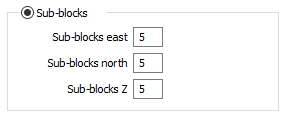
Sub-blocks
Sub-blocks East, North, Z
If you selected Sub-blocks as the
If the volume factor is not 2 or 4 or 5 or 8 or 10, then block size fields should have at least 5 decimal places, otherwise 3 decimal places.