Manage Scheduled Tasks
On the Services ribbon: Select System | Administration | Manage Scheduled Tasks to schedule routine system tasks and productivity tasks, for example, shift cycle updates and the publication of reports.

The following types of task can be scheduled:
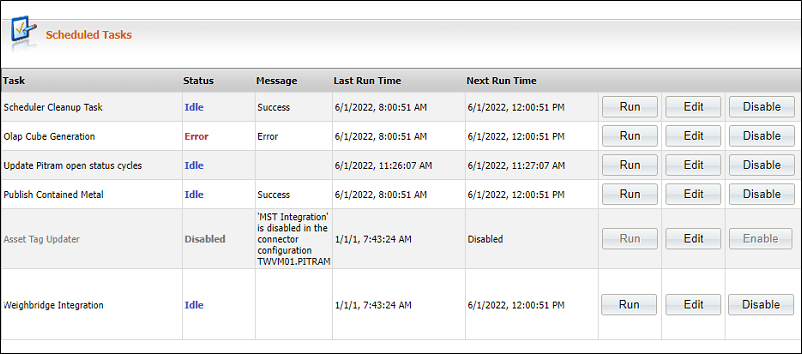
Each of the tasks has its own task schedule. Click Edit to open the Edit Task Schedule dialog and define the schedule for each task:
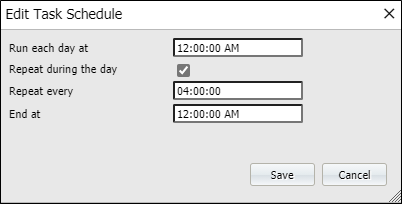
Run each day at
The time that you want the task to be run on a daily basis.
Repeat during the day
The task is to be run more than once a day.
Repeat every
Define the frequency at which the task will be run. The Repeat every (time interval) can be defined down to a 1 second interval.
End at
The time at which the task will be stopped.
Scheduler Cleanup Task
This task is used to remove reporting jobs from the scheduled jobs list of the Reporting service. Only jobs that are older than 61 days will be removed. Removing redundant scheduled jobs means that the Schedule Jobs list becomes more manageable.
The jobs and related data are stored in the Pitram Portal Warehouse database. The affected tables are:
- dbo.ScheduleParameters.
- dbo.Schedule.
- dbo.TransitData.
OLAP Cube Generation
Use the OLAPCubeGeneration task scheduler to run an OLAP Cube report. At the scheduled frequency and time, this task will run the following to access the latest data:
-
Load OLAP Data Windows.
- Build OLAP Cube.
OLAP Cube reports are defined in the Reporting service.
Update Pitram Open Status Cycle
The time that a unit of equipment is allocated to a particular status is an event stored in the database. The difference between the allocated time and the current time, or the status change time, is the duration that the equipment was in the designated status. To keep the duration up-to-date, it must be frequently recalculated. The more frequently the duration is calculated, the more accurate the data.
Publish Contained Metal
Configuration options, accessible via the Materials Management menu, determine how materials and grades are processed by Pitram:
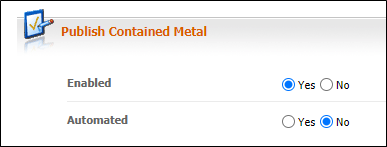
If the publication of contained metal is enabled and automated, you can set the frequency of publication here.
Asset Tag Updater
Asset Tag functionality updates a person, or an equipment's position based on the association between equipment and person. MST Integration must be enabled via the Connecter configuration.
This scheduled task will update the status information for asset tags.