Phosagro Weighbridge Connector (PWBC)
This topic describes how to install and configure the Phosagro Weighbridge Connector and its associated software. For an overview of this functionality, refer to the Weighbridge Connector Service topic.
 Installation
To run the installer, launch the setup file setup_pwbc.exe.
This will install a Windows service Pitram PWB Connector service, which will need to be manually started once installed, and configured.
The connector has two (default) installation locations:
- The Program (C:\Program Files\Micromine\PWB Connector)
- Data files (C:\ProgramData\Micromine\PWBC\_installs)
Data Files and Configuration, one time setup
The first time the setup is run, we have the following files installed into a temporary program data folder (for example, ProgramData\Micromine\PWBC\_installs).
- GeneralConfiguration.xml (all general configuration including connection strings)
- DatabaseMarkerConfiguration.xml (holds the value of the Id field in the PWB database that is the next to process)
- PWBCLocalDatabase.sdf (default local compact database we use for processing if the connection string for the local database is left as default)
- SSCERuntime_x64-ENU.exe is the installer for SQL CE (the default database)
The following files will need to be copied into the parent folder, ie ProgramData\Micromine\PWBC
|
GeneralConfiguration.xml DatabaseMarkerConfiguration.xml PWBCLocalDatabase.sdf |
SQL Compact
If the connector is going to use the default SQL compact database, the file SSCERuntime_x64-ENU.exe may need to be run to install the native SQL CE files.
Reference Data
The connector requires two groups of reference data:
- A new group Exciter.
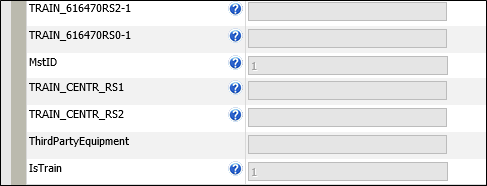
- The existing Equipment group with its MstID attribute set (this will map ICA mobile_entity_id to a Pitram equipment code).
- The IsTrain attribute set to 1 (to identify the equipment as a train):
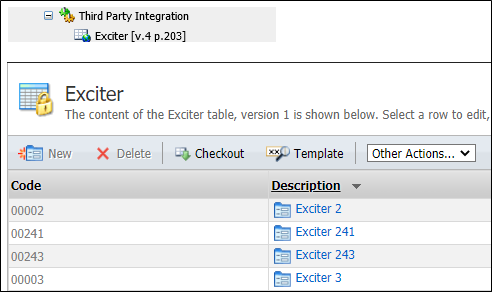
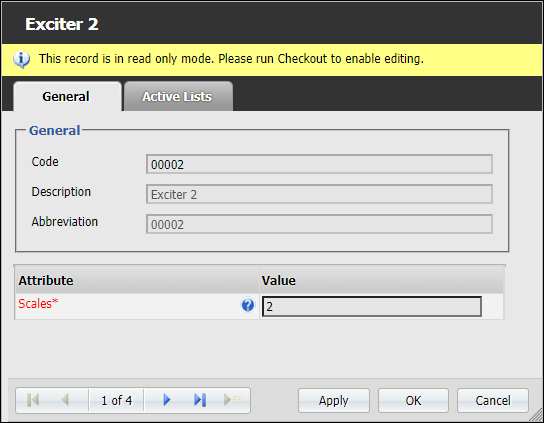
This will map the ICA path_nearest_location_Id to the weighbridge scales:
The equipment representing the trains must also have a function of LOADING and duplicate dumps must be disabled.
General Configuration
Along with the above database configurations, all general configuration is held in GeneralConfiguration.xml. This includes email configuration, however this is not used by this connector (yet).
Other fields are:
| Field Name | Purpose |
|---|---|
| ICA_LookupTime_Tolerance_Seconds |
When we have a record from the WB database, we use the time of the first wagon to look for a matching equipment in the ICA database. This setting defined the range of the total window we look for in the ICA database. So if this is 120 seconds, we look 60 seconds either side. If more than one row is found, we use the closest |
| Payload_Min_Valid_Value | If after a calculation, a payload (TONNE) is less than this, we log a message and then use this value as the payload (typically 0) |
| ICA_Database_ConnectionString | ICA (PostgreSQL) database connection string |
| ICA_Database_TableName | Table name in the ICA database |
| PWB_Database_ConnectionString | Phosagro Weighbridge database Connection string |
| PWB_Database_TableName | Table name for the WB database If blank, uses the default table (mvans) |
| Local_Database_ConnectionString | Local database Connection string. Can be SQL compact (default) or SQL server Example strings 1. SQL compact: Data Source=C:\ProgramData\Micromine\PWBC\PWBCLocalDatabase.sdf;Persist Security Info=False; |
| Local_Database_TableName | Table name for the local database. If blank, uses the default table (localStore) |
| Local_Database_Hours_To_Keep_ProcessedData | How many hours to keep processed data in the local store (data marked as processed will be deleted after this time) |
| Polling_Frequency_Seconds | The connecting polling frequency |
| System_Errors_Timeout_Minutes | (Inherited from the "Base" system) The amount of time application tries to recover from system (for example connectivity) errors before managing them as unrecoverable. Default is 10 minutes |
| PRIS_Server | Location of PRIS |
| TraceLevel | Trace level. Possible settings: Off, Verbose (i.e. debug/all), Information, Warning, Error |
| Email (section) | Not used by this connector (at least yet) |
Database Configuration
The connector has three database connections:
- Phosagro weighbridge database (WBDB) the primary source of data.
- ImPact Communications Appliance (ICA) Database
- A Local database - used by the connector for persistent information processing.
(used to find what equipment is at a Weighbridge using the time from the Weigh Bridge database (WBDB) and an ICA identifier mapped to a “Scales” attribute in the reference data which identifies the Weighbridge.)
These can be configured in GeneralConfiguration.xml. Here you can set the connection string and the table names to be used for each of the above.
Local Database
This has a single table, localStore (by default). This table is used to first copy in data from the weighbridge database, and then used as a "working scratchpad" to then collect data from ICA and Pitram.
This can be either a compact database (supplied with the installation) or any SQL database that the connection string is configured for. In this case the table will need to be created.
The script for this is as follows:
|
SET ANSI_NULLS ON GO SET QUOTED_IDENTIFIER ON GO CREATE TABLE [dbo]. [localStore]( [Id] [int] NOT NULL, [Trnum] [int] NOT NULL, [Num] [int] NOT NULL, [Scales] [int] NOT NULL, [BwTime] [int] NOT NULL, [Brutto] [int] NOT NULL, [Status] [int] NOT NULL, [IcaSysId] [int] NOT NULL, [Equipment] [nvarchar] (50) NULL, [CycleStatus] [nvarchar] (50) NULL, [IcaExciterTime] [nvarchar] (50) NULL, [ProcessedState] [int] NULL, [TimeLogged] [nvarchar] (50) NULL, CONSTRAINT [PK_localStore] PRIMARY KEY CLUSTERED ( [Id] ASC )WITH ( PAD_INDEX = OFF, STATISTICS_NORECOMPUTE = OFF , IGNORE_DUP_KEY = OFF, ALLOW_ROW_LOCKS = ON, ALLOW_PAGE_LOCKS = ON ) ON [PRIMARY] ) ON [PRIMARY] GO |
The fields within the local database are the relevant fields for the WBDB, plus some others as described below:
| Field Name | Purpose |
|---|---|
| Id | Id from the PWB database |
| Trnum | Trnum from the PWB database (this identifies a single train instance at a weighbridge) |
| Num | Num from the PWB database (this identifies each wagon that belongs to trnum) |
| Scales | Scales from the PWB database (id of the weighbridge) |
| Bwtime | Bwtime from the PWB database (this is the time we use as the "weighing time" |
| Brutto | Brutto from the PWB database (weight in Kgs) |
| Status | Status from the PWB database |
| IcaSysId | Sys Id of an exciter location we read from the ICA database, via a mapping for the scales field (path_nearest_location_id) |
| Equipment | Equipment code queried from Pitram via themobile_entity_id from the ICA database |
| CycleStatus | Cycle status from Pitram of the (Train) Equipment |
| IcaExciterTime | The time of the first wagon was weighed for a train (i.e. time for num=1 for each trnum) |
| ProcessedState | Where the connector is up to with the processing (see later) 0 to 3: 0: Unprocessed, 1: WaitingSysIdMapping, 2: ReadyToMatch, 3: Processed |
| TimeLogged | The time the data is first copied from the Weighbridge database to this local database |
Tracing
Tracing can be configured via GeneralConfiguration.xml, via the <TraceLevel> node. Settings are as follows:
| Trace Levels |
|---|
| Off |
| Verbose |
| Information |
| Warning |
| Error |
For in-house testing, it is recommend that the level be set to Verbose using a filter as described below.
The tracing (at the moment) for some reason always prints out a header row "PWB-Pitram Connector Verbose: 0 ". Since our tool of choice (DebugView) can only filter on a single line, we need to include PWB-Pitram Connector on each line. The other header line is then just noise so we exclude it by configuring the DebugView filter as follows:
|
Include Exclude PWB-Pitram Connector PWB-Pitram Connector Verbose:0 : |
Top Level Processing Logic
For each step below, we use the value of the field ProcessedState to indicate where we are in the processing stage. Knowing this, we do the following to get data from the Weighbridge Database (WBDB), and then go on to try and fill out the other fields of the local database:
- Get any new data from the WBDB.
- Get any newly matching data from the ICA database.
- Get Exciter Id
- Get weighing time of a trains first wagon
- Look for Equipment code and Cycle status data from Pitram (via PRIS)
- From the mobile_entity_id found above, search for a Pitram equipment code via it's MstId attribute mapping (reference data).
- Once we have the equipment code, look up the Cycle status of the equipment at the IcaExciterTime
- Match Traveling Empty rows with Hauling Rows
- Get the each group of Traveling Empty Rows (sorted by ID hence time)
- Using the equipment code for the Traveling empty rows, look for the most recent set of rows with the same equipment id and with cycle status Hauling
Get new any new data from the Weighbridge database (where id >= id from marker file), and copy info local database. Fills in just the fields from the WB database, and logged time) ProcessedState field = Unprocessed (0)
Try and match Unprocessed rows with ICA Data. From 1, we have Bwtime, and Scales. From Scales, we look in the reference group Exciters, and find an Exciter code that has an attribute = to the scales value. This exciters code will be the value of the ICA path_nearest_location_id.
For each train in the WB data (ie for each trnum), we want the wagon with the ealiest bwtime (which is always going to be row with num = 1)
We now look for any rows in ICA database that match the following using results from a) and b)
ICA Rows = get rows where path_nearest_location_id = Exciter code found above AND position_time = time found in b) +/- ICA_LookupTime_Tolerance_Seconds (from general config)
If we find more than one row, we use the ones with the closest time to the bwtime time.
IF we find the above match we fill in IcaSysId (from mobile_entity_id from the ICA database) and IcaExciterTime (the position_time from the ICA database) in the local database data *for all records (wagons)* for that train. Set processedState to WaitingSysIdMapping (1)
If Cycle Status = Hauling or Traveling empty,
set processedState to ReadyToMatch (2)
else
processedState to Processed (3) (incorrect cycle status, we can do no more with these records - message logged)
For any rows where the ProcessedState = ReadyToMatch (2):
If no hauling rows,
mark all the traveling empty rows (for this train) processed (if there are no hauling rows, there never will be)
else
Check status codes and submit any payload events for matched rows (with measure always TONNE, as we convert kgs to TONNE)
Look for any previous hauling rows - mark as processed (as we don't want these to be matched with any later traveling empty rows)
Message and Error Codes
Below is a list of messages that will be logged into the Windows Event Log (and will also be traced if tracing is enabled at the appropriate level):
- All messages have the PWBC_ prefix
- All status messages are in the 0200s
- Status messages will also be sent to a new pane in Data Acquisition via the general services message logging system
| Code | Message | Comments |
|---|---|---|
| PWBC_0001 | File not found: '{0}'. | {0}: path to file |
| PWBC_0002 | Error reading marker file position information from the field '{0}'. | {0}: marker field name |
| PWBC_0003 | Error writing the marker file position information to the file '{0}'. Error: {1} | {0}: file path {1}: exception message |
| PWBC_0004 | Could not find a mapping of the following weighbridge scales to ICA exciter Ids: ‘{0}’. | {0}:list of unmapped scales |
| PWBC_0005 | Could not find a mapping to Pitram equipment for the following ICA Sys Ids: ‘{0}’. | {0}:list of unmapped sys ids |
| PWBC_0006 | Error while processing ICA information: {0}. | {0}: exception message |
| PWBC_0007 | Error getting cycle status for equipment '{0}' from PRIS: '{1}'. | {0}: equipment code, {1} error from PRIS |
| PWBC_0008 | PRIS reported the equipment '{0}' was not found in reference data while querying for it's cycle status. Equipment skipped and processing resumed for other equipment. | {0}: equipment code |
| PWBC_0009 | Error getting cycles states for equipment from PRIS. Able to process {0}/{1} weighbridge data rows. Error: {2}. | {0}: number of equipment successfully processed, {1}: total number to process, {2} exception message |
| PWBC_0010 | The following weighbridge records could not be processed due to an incorrect cycle status being set for the equipment…{0}{1}{0} | {0}: double line feed, {1} list |
| PWBC_0011 | The following weighbridge records where the equipment were found to be in the traveling empty cycle status, could not be processed due no matching hauling records …{0}{1}{0} | {0}: double line feed, {1} list |
| PWBC_0012 | The following weighbridge records where the equipment were found to be in the hauling cycle status, could not be processed due no matching traveling empty records …{0}{1}{0} | {0}: double line feed, {1} list |
| PWBC_0013 | Not all rows for the equipment ‘{0}’ while traveling empty could be matched with hauling rows. {1} out of {2} rows could be processed. Id of first hauling row was {3}, Id of first traveling empty row is {4}. Unmatched traveling empty rows are: {5}{6}{5} | {0}: equipment code, {1}: rows hauling, {2}: rows travelling empty, {3}: WBDB Id of first hauling row, {4}: WBDB Id of first travelling empty row, {5}: double line feed, {6}: list of unmatched rows |
| PWBC_0014 | Did not get expected number of movements to match payload event. Expected {0}, but found {1}. | {0}: expected movement count, {1} found movement count. |
| PWBC_0015 | Calculated payload value of {0} {1} at {2} for equipment {3} was below the minimum value of {4}. Adjusted up to {4}. | {0}: payload value, {1}: measure code, {2}: formatted datetime, {3}: equipment, {4}: min allowed measure value |
| PWBC_0016 | Database marker value {0} found to be the maximum Id or {1} in the local database. Marker position adjusted to {1}. | {0}:marker position, {1} local database max position (value of id field) |
| PWBC_0200 | {0} {1}, wagon {2}: Not weighed. | {0}: formatted time string(s), {1}: equipment, {2}: wagon number |
| PWBC_0201 | {0} {1}, wagon {2}: Data has been edited in editor. | {0}: formatted time string(s), {1}: equipment, {2}: wagon number |
| PWBC_0202 | {0} {1}, wagon {2}: Long stop during weighing. | {0}: formatted time string(s), {1}: equipment, {2}: wagon number |
| PWBC_0203 | {0} {1}, wagon {2}: Direction change during weighing. | {0}: formatted time string(s), {1}: equipment, {2}: wagon number |
| PWBC_0204 | {0} {1}, wagon {2}: Speeding during weighing. | {0}: formatted time string(s), {1}: equipment, {2}: wagon number |
| PWBC_0205 | {0} {1}, wagon {2}: Excess acceleration during weighing. | {0}: formatted time string(s), {1}: equipment, {2}: wagon number |
| PWBC_0206 | {0} {1}, wagon {2}: Unsatisfactory quality of weighing. | {0}: formatted time string(s), {1}: equipment, {2}: wagon number |
| PWBC_0207 | {0} {1}, wagon {2}: Exceeded scales weight limit. | {0}: formatted time string(s), {1}: equipment, {2}: wagon number |
| PWBC_0208 | {0} {1}, wagon {2}: Overloaded. | {0}: formatted time string(s), {1}: equipment, {2}: wagon number |
| PWBC_0209 | {0} {1}, wagon {2}: Underloaded. | {0}: formatted time string(s), {1}: equipment, {2}: wagon number |