Weighbridge Pending Pane
A weighbridge is used to accurately record the amount of material on-board the truck. When a truck passes over the weighbridge, the third-party weighbridge recording device transmits this data to the system. The data record is validated by to ensure that it can be saved as a dump event. The record will either be valid or it will be invalid.
- Valid
For example, a record is only valid if the truck has an Operating status. The actual name of the status need not necessarily be Operating, but the status must belong to the StatusGroup = Operating. A record may still be valid, for example, if a Truck has a Standby status and StandBy is defined in Reference Edit as a member of StatusGroup = Operating.
- Invalid
A data record has missing or conflicting information. For example, the Destination is Material = Waste while the hauled Material = Ore.
There are two levels of errors that can result in a record being marked as invalid:
-
 Non-critical errors or warnings. For example, some column values are missing and must be entered or selected. (The validation test assumes that all configured columns are required columns).
 -
 Critical errors. These types of error must be corrected using the Edit option - or it may be necessary to use the Event Editor to correct the data.
For example:
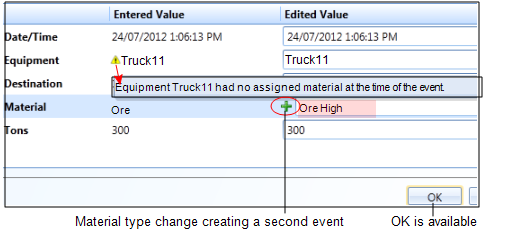
A Material type was not included in the data that was transmitted to , even though the Material type of the source location is defined. If the Material selected is the same as that of the Source location, the warning is removed and a single Dump event can be submitted.
However, if a Material type is selected which is different to that of the Source location, a Plus symbol + is shown to the left of the text box indicating that a second " Material Change" event has also been created.
For example:
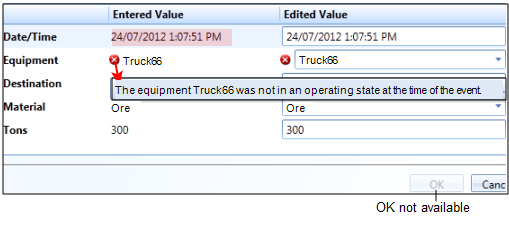
Truck66 was not in an operating state at the time of the event. An event must be entered in the Event Editor to assign Truck66 to an Operating status. This event MUST be at a time prior to the stated Date/Time of the weighbridge record. Once the new event has been created, the critical error will be removed and the Dump event can be submitted (a Status Change event has also been added in the Event Editor):
The Weighbridge Pending pane can be configured to be in one of two modes:
- Manual. In Manual mode, all records—both valid and invalid - are shown. Options can be chosen to Submit valid records, and Edit or Delete invalid records.
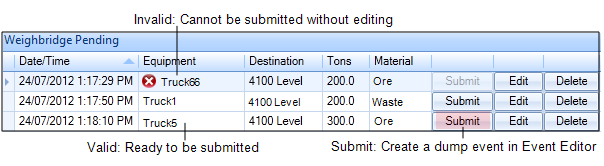
- Auto. In Auto mode, only invalid records are shown. Valid records are automatically submitted to the Pitram database as dump events. Invalid records must be edited and corrected before they can be submitted.
Submit
This option will only be available for valid records. When a record is submitted it is saved as a dump event in the Pitram database. Valid records should be submitted without delay to ensure that production reporting is up-to-date.
Edit
This option will open an Edit dialog. The OK button on the dialog will only be enabled after corrections have been made to make the record valid.
Delete
This option should be used with caution. You should only delete a record when you are sure that the dump information is invalid and cannot be corrected.
A recorded weight could be either the weight of the material or the weight of the material plus the truck, depending on the configuration of the third-party weighbridge system.