What is Pitram Mobile?
Pitram Mobile devices are essentially data collectors. Data is captured and transmitted via the mobile devices fitted to equipment units (trucks, excavators, graders, loaders, drills, etc.) operating on site. Mobile data capture can be automatic (triggered by the dispatch system using on-board telemetry, for example) or it can be manually entered by the equipment operator (using the keypad or touch screen of the mobile device).
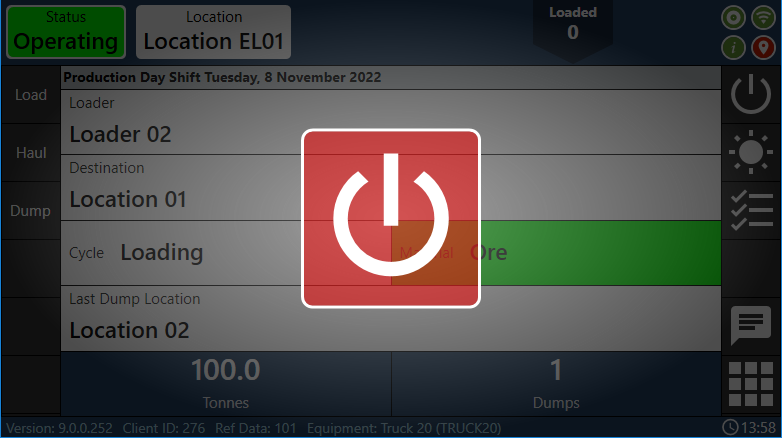
The Mobile interface utilises TCP/IP wireless networks, GPS devices, RFID tagging systems and on-board management systems. Data as diverse as tyre pressures, average speeds, oil pressure, tonnes hauled per hour, current location, etc can be recorded.
Pitram Mobile is configured in Reference Edit. The software is installed on purpose-built units installed within the cabs of equipment units. An Administrator may also install it on a computer—such as a laptop.
For sites that have an automated data capture system, Mobile is the link between the Equipment Operator, the Control Room Operator (or the Dispatch system) and the Pitram Database.
Some Mobile software components are available in Data Acquisition:
Mobile Health Panel
The Mobile Health Panel is a diagnostic tool used to monitor the telemetric health of the mobile fleet. When defining the panel the following features are available:
- Set Amber and Red warning thresholds to indicate the time since a Mobile communication was last received.
- Set a Days threshold which is a measure of the number of days since the last communication. After this number of days the Mobile unit will be removed from the pane.
Text Messages
A text message can be transmitted to a selected operator or unit of equipment. Go to Text Message on the toolbar to open the message dialog. Messages sent can be viewed in the Notifications pane.