Equipment Display Options
The Tools | Equipment Display Options option opens a dialog from which you can customise display options for large equipment and for small trucks on the Equipment display panel.
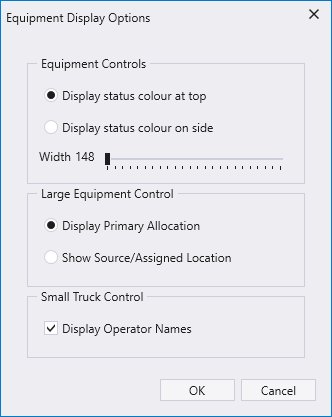
In the Equipment Controls section, you can select an option to Display status colour at top or the Display status colour on side. This determines where the status indicator colour bar will be displayed in the panel. Additionally, you can set the width of the status indicator colour bar. The default setting is the minimum 148 (pixels), and the maximum width is 608 (pixels). The panels which utilise the status indicator colour bar are:
-
Equipment Allocation
-
Loaders and Trucks
-
Location Activity
-
Multiple Loaders and Trucks
-
Train
In the Large Equipment Control section of the dialog, you can select an option to Display Primary Allocation or Show Source/Assigned Location for large equipment on the panel.
In the Small Truck Control section of the dialog, the Display Operator Names check box allows you to display truck operator names in the Trucks and Loaders panel.

The option is turned Off by default.
For information on the Trucks and Loader panel, see Loader and Trucks Panel.