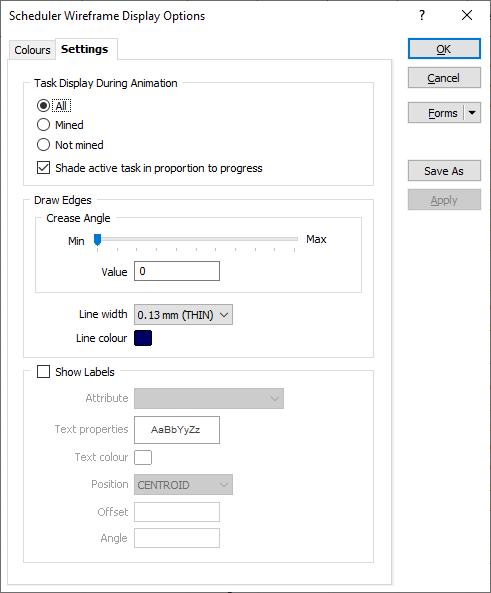
Settings
Use the options on the Settings tab to fine-tune the appearance of the cached wireframe layer and and control how tasks are displayed during an animation (choose whether mined or not mined (in-progress) tasks are shown).
Task display during animation
When you run an animation, you can choose to display All tasks, Mined tasks, or Not Mined tasks. The colour of the tasks will be based on the settings in the Colour tab of the form.
You can also select an option to shade active (in-progress) tasks according to the progress made, where the shade of an active task becomes progressively darker as the task moves closer to completion.
Draw Edges
Use the Crease Angle input box and slider bar to adjust the display of the edges between wireframe facets. If you are entering an angle value, press the TAB key to update the slider.
Crease Angle
If the interior angle between two wireframe facets is less than or equal to the specified crease angle, a crease line will be drawn.
Setting the slider bar to a maximum will make all of the edges along a surface visible.
Line Width and Line Colour
Specify a (THIN, MEDIUM, THICK) line width and a line colour for the edges drawn between the wireframe facets.
Show Labels
Select this check box option to show attribute labels in Vizex.
Attribute
Use the drop-down list control to select the attribute values you want to label.
Text Properties
Double-click on the Text Properties Preview box to select a font and set text properties for the labels.
Text colour
Double-click (F3) to select a colour for the label text.
Position
Select where you want the label to be positioned, either over the wireframe Centroid, or Above, Below, to the Left, or to the Right of the wireframe bounding box.
Offset
If you have chosen a label position other than Centroid, specify an offset from the bounding box of the wireframe (in grid units). A negative offset will position the label inside the bounding box of the wireframe. A positive offset will position the label outside the bounding box of the wireframe.
Angle
Specify the angle (0° to 360°) at which the annotated text will be drawn. An angle of 0° (the default) results in horizontal (to the right) text. An angle of 90° results in vertical (to the top) text.