Substitution Parameters
When you define a query (on a database, for a graphic report, for a data view, as part of a configured process) you can set substitution parameters in the Substitutions page of the Property Editor.
Caching of Substitution Parameter Values
When a Micromine Geobank object is used frequently, it is common that the same or similar values for its parameters are used each time. For this reason, Micromine Geobank stores a "cache" of the last-used values for each user on their local machine. This section explains how this process works.
For System Substitution Parameters:
- The run-time value of the system parameter is always used and is never cached.
For Global Substitution Parameters and Substitution parameters configured within an object, the last used value is stored in a local cache based on:
- The user, Micromine Geobank connection and parameter name for Global Substitution Parameters
- The user, Micromine Geobank connection, object id and parameter name for Substitution Parameters within an object
This means that the cached values of global parameters are shared across objects, however, for same-name local parameters they are not.
The list below shows, in order of priority, how parameter values are set at run-time (when an object is executed):
- If the value for a parameter is provided by another object; a Form, a master Report or a Macro, then the provided value is used automatically. If a default value is configured and “Always use this default as the initial display value” is selected, then the default value is displayed.
- If a cached value is found, then:
- If it is a SQL-generated ‘List of Values’ parameter and ‘Limit user’s response to values in the pick list’ is selected, then the cached value is compared to the current list of values generated by the SQL script. If it is still in the list, it is displayed. If not, then the logic moves to item 4.
- The cached value is displayed. If a default value is configured it is shown. If none of the above apply, a blank is shown.
- If a default value is configured it is shown.
- If none of the above apply, a blank is shown.
The following types of substitution parameter can be configured:
System Substitution Parameters
Global Substitution Parameters
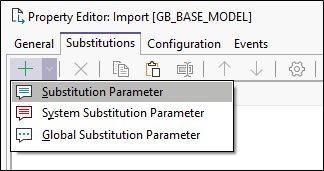
Use the options provided on the toolbar to manage the items in the list:

|
Click Add to add a new item to the list. |

|
Click the Delete button to remove the item currently selected in the list. |

|
Click the Move Up button to move the current item up the list. |

|
Click the Move Down button to move the current item down the list. |

|
Click the Properties button to view the properties of the currently selected item. |

|
Click the Copy button to copy the currently selected item in the list. |

|
Click the Paste button to paste (and add) the copied item to the list. |