Calculation Options
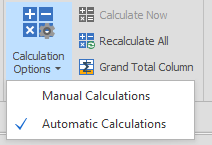
If you are using Calculated Fields, then switching the Calculation Option from the default (Automatic) to Manual allows you to make several changes to your data without having to wait for the Table View to recalculate and re-aggregate your Data.
Calculate Now

With the Calculation Option set to Manual, clicking Calculate Now will perform the same calculations that would happen on every change under Automatic mode. Recalculate All forces every Field to be recalculated whether or not the application has detected changes to the Table.
Recalculate All

Grand Total Column