Newtrax Integration
This topic describes how to install and configure the Newtrax Connector. Pitram integrates with Newtrax's IoT and analytics technologies to automatically record data on operations; including people, equipment and locations.
Installation
To run the installer, launch the setup file Newtrax Connector Setup.exe.
The setup file will install a Windows service Pitram Newtrax Connector service, which will need to be manually started once installed, and configured.
The connector default installation location is:
C:\Program Files (x86)\Micromine Pty Ltd\Newtrax Connector
Note: Net framework 4.7.2 or higher is required.
The connector is a standard .Net configuration file. Tracing for System.Net is configured to "Error" by default. That is done to:
-
Simplify PRIS calls network failures diagnostics
-
As an example how to configure network tracing (documented at docs.microsoft)
When the Newtrax Connector is installed, the following manual configuration is required.
Reference Data
The integration requires groups of reference data to be deployed:
-
Integration - Defines the integrations available.
-
IntegrationMapping - The mapping between Pitram tokens and tokens used in 3rd party integrations.
-
IntegrationMappingAttributes - Mapping between the Integration and the Pitram reference group and attribute.
To enable integration in Data Acquisition, reference groups must be deployed from Reference Edit.
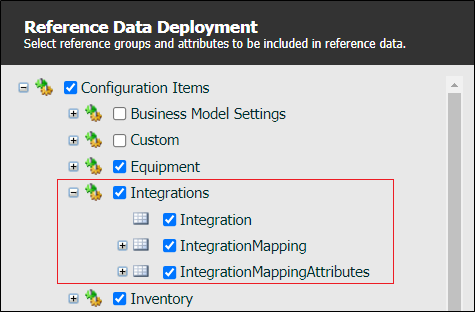
To access the Integrations configuration screens:
Click on the Reference Edit icon to open the Reference Data service:

The first step is to set up the integrations that will be mapped and configured.
Integration
In the Reference Data tree view, click on the Integration reference group:
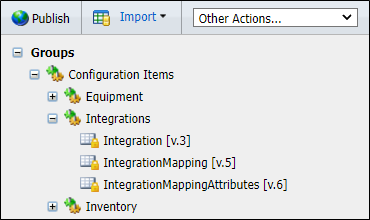
The Integration configuration screen is displayed:
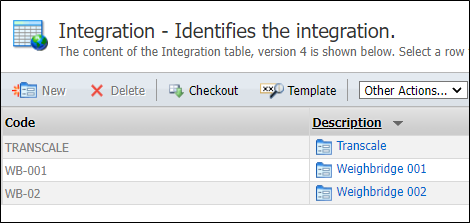
The configuration screen lists the existing Integrations. To create a new Integration, Checkout the table and click New.
The following parameters must be configured:
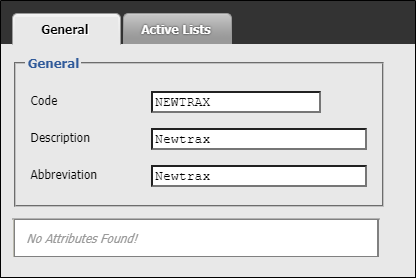
With the Integration created, equipment mapping is to be defined in the IntegrationMapping reference group.
Integration Mapping
Click on the IntegrationMapping reference group:
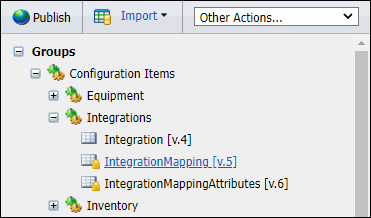
In the Integration Mapping configuration screen, Checkout the table and click New to create a new Integration Mapping.
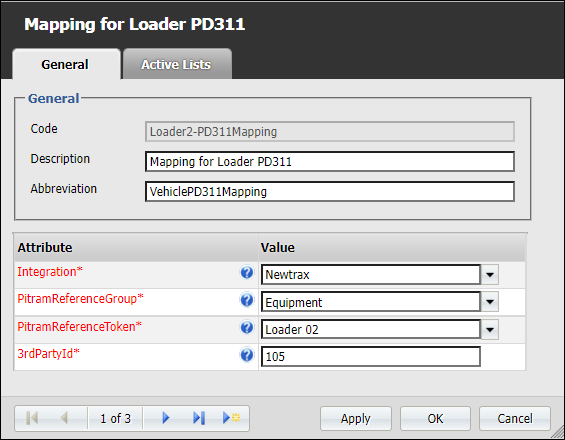
Each Newtrax equipment should be configured as follows. Note: Only the Equipment reference group can be used as PitramReferenceGroup.
The following parameters must be configured. Mandatory attributes appear asterisked and in red:
Measure Mapping
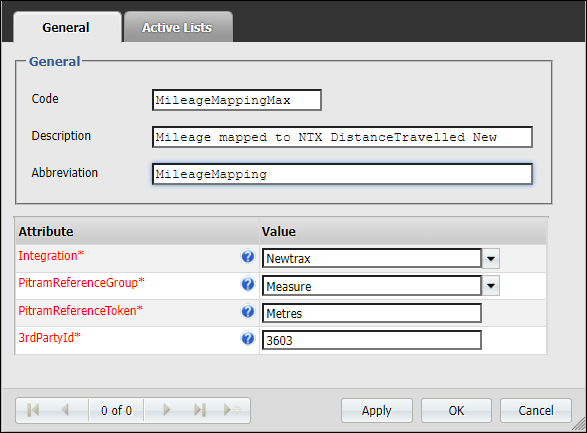
Measures mapping is to be defined using the IntegrationMapping reference group. Each required measure should be defined as follows. Note: Only the Measure PitramReferenceGroup can be used.
Create a new mapping for each required measure using the process outlined in Integration Mapping. The following parameters must be configured:
Notes on Measure Mapping
-
Set the 3rdPartyId to the VehicleId from the Newtrax VehiclesAll table.
-
Make use of the FuelConsumption code in 3rdPartyId for fuel consumption. The EventConditionDefId as fuel consumption is imported from the Segments table, which is not mapped to any EventConditionDefId.
-
The EventConditions table, where measurements are stored, has 3 columns: Min, Max and Avg. The columns required depend on the measure. Max is taken by default. If you need to make use of another column, or you need convert measure units, add an item to the Formulas node in GeneralConfiguration.xml. For example:
<Formulas>
<_3rdPartyId value="3565">(max-min)/3600</_3rdPartyId>
</Formulas> -
Make use of the 3629 value for payload. Newtrax EventConditionDefId is hardcoded to identify that payload PRIS method, instead of the measure PRIS method that must be called.
-
Make use of the 3565 value for engine hours. Newtrax EventConditionDefId is hardcoded to identify that delta value that comes from Newtrax and must be summed with rollover value. As engine hours are stored in seconds, the final value will be 3565|(max-min)/3600
General Configuration
Along with the above database configurations, all general configuration is held in GeneralConfiguration.xml.
Other fields are:
| Field Name | Purpose |
|---|---|
| Database_ConnectionString | Standard MS SQL connection string. Format description can be found at SqlConnection.ConnectionString specification. The easiest connection string sample which points to local database is available in GeneralConfiguration.xml. |
| CommandTimeout | Command timeout for Newtrax database. Measured in seconds. |
| PRIS_Server | The location of the PRIS Server |
| PollFrequency | Poll frequency for Newtrax database. Measured in seconds. |
| TraceLevel | Trace level |
| DaysToKeepTracerLogs | Days to keep tracer logs |
DatabaseMarkerConfiguration.xml
Both EventId and SegmentId have -1 values by default. That means that no import will be done at the first run, but EventId and SegmentId will be updated to latest values which are present in Newtrax database.
Logging
There are two targets where connector logs are saved:
-
Pitram-Newtrax Connector event log (%SystemRoot%\System32\Winevt\Logs\Pitram-Newtrax Connector.evtx)
-
.log files in %ProgramData%\Micromine\PITRAM\Logs folder
The event log is intended to monitor service health. The .log files include events logged to event log and much more information that can be useful to resolve issues:
<date>-NewtraxConnector_common.log - Import logic flow
<date>-NewtraxConnector_NewtraxDatabase.log - Newtrax database queries
<date>-NewtraxConnector_PrisProvider.log - Pris calls (logic layer)
<date>-NewtraxConnector_System.Net.log - Pris calls (network layer tracing)