The object of the Development Advance option is to compare the surveyed advance values against the claimed or saved value for a drive. As a drive advances, the surveyor will measure the advance distance and enter them into the Development Advance option. The ability to record the surveyed development advance is a key requirement for most underground sites.
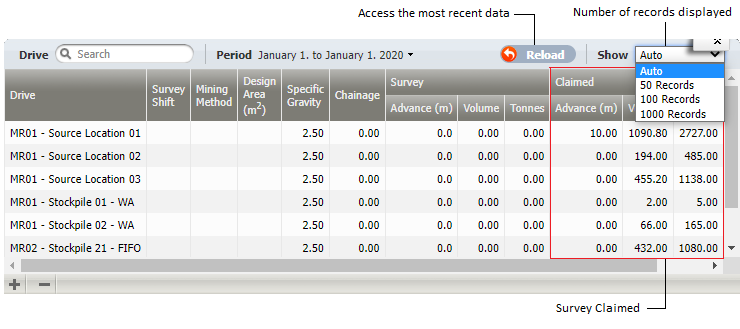
Claimed values are derived from drilling results (Metres Advanced, for example) and source-destination movements (Tonnes, for example) entered via Data Acquisition. The Survey values are check measurements made by the Surveyor.
Working with Development Advance
Development Advance window
Select Development Advance on the Surveying header to open the window.
The workspace has the following areas:
-
Workspace header. The header displays the:
-
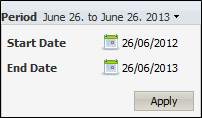
Period. Select the appropriate Start and End dates to define the period that you want of work with. Click Apply to save the settings. The workspace will display any locations for which there are movement measures during the defined period.
- Reload button. Select this button to access the most recent data set.
-
View. Select to define the number of records in the workspace display. Auto will display all records.
-
-
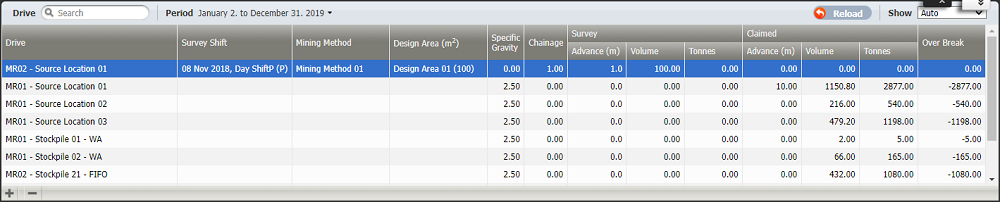
Workspace. The workspace displays only one record for each location (or drive) for a shift for the defined period if there has been either a:
- Measure values recorded during the period for either the material quantity or the advance distance.
- Surveyed distance has been recorded for the location in the shift.
At some sites there is no distinction between a location and a drive - a drive is one location with one mining face. At other sites, a drive is made up of many locations and there are many advances.
If Map Locations To Drives in the Configuration option is selected, only Locations with a Drive attribute are displayed in the workspace.
If the site has:
- Not defined locations as drives. It is very likely that the surveyed advance distance would be updated monthly or when the drive was completed.
- Locations as a subset of a drive. It is very likely that the advance distance would be updated more frequently—at the completion of each individual location or advance, or at the end of the shift.
 Workspace Columns
Each record in the workspace includes the following columns:
| Column | Description |
|---|---|
| Drive |
If Map Locations to Drives configuration is:
|
| Survey Shift |
The shift during which the survey measurement was taken. This default shift displayed is the last shift of the defined period. |
| Mining Method |
Mining Method is a token defined in Configuration Items | Surveying of the Reference Edit service. Select a value from the list of defined Mining Methods. Mining Method has no affect on the Survey or Claimed results. |
| Design Area (m2) |
The Design Area is a token defined in the Surveying area of Reference Edit. This token has a Tunnel Design Area attribute which defines its m2 which is the width * the height of the tunnel. Select a Design Area token from the drop-down list. This value is used to quantify the Claimed and Survey volumes (Design Area * Advance). |
| Specific Gravity |
This the material density. This factor is used to convert a volume to a mass (m3 to tonnes). A default value, defined in Configuration, is displayed. A precision of two decimal places is used. |
| Chainage |
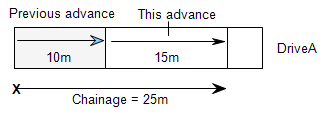
The distance along a drive from the surveyed start point to the end of the current advance.
A precision of one decimal place is used. |
| Survey | |
| Advance (m) |
The surveyed distance in metres, feet or yards that a drive has advanced during the survey period. A precision of one decimal place is used. |
| Volume |
The volume = Design Area * Survey | Advance. In Configuration, if Survey Volume is Read Only is set, this value cannot be edited. |
| Tonnes |
The tonnage (sum of all movements from this drive in the surveyed period) = Survey | Volume * Specific Gravity. In Configuration, if Survey Tonnes is Read Only is set, this value cannot be edited. |
| Claimed | |
| Advance (m) |
Display Only. The claimed distance, saved as events in the database. This value would have been the achieved Metres Advanced measure, for example, that a jumbo or drill achieved during the shift for the location. A precision of one decimal place is used. |
| Volume |
Display Only. The volume = Design Area * Claimed | Advance. |
| Tonnes |
Display Only. The tonnage (sum of all movements from this drive in the surveyed period) = Claimed | Volume * Specific Gravity. |
 Edit a record
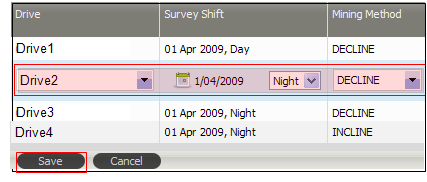
To edit a record, double-click on the record or row. A text box, for Specific Gravity for example, or a drop-down list (Design Area) will be available to edit or change the current value. After editing, you will be prompted to save or cancel your changes.
Click Save on the lower-left.
Add or delete a record
To Add a record click the plus + button at the lower-left of the workspace. An empty record will be added to the workspace. All the appropriate drop-down options and text boxes will be available to define the record.
Click Save to save the new record.

The record, for example, may be for a location in a drive that has not, at this stage, been entered as events in the database.
Similarly, click the minus - button at the lower-left of the workspace to delete the current record.
Summary display
When you click on a record in the workspace, the Summary panel is displayed at the bottom of the workspace.

The Summary presents the following information for the current drive:
| Items | Description |
|---|---|
| Total Surveyed Advance | Sum of all surveyed advance measures. |
| Total Surveyed Volume | Sum of all the survey volumes (Design Area * Survey | Advance). |
| Total Surveyed Tonnes | Sum of all the surveyed tonnes (Survey | Volume * Specific Gravity). |
| First Survey | The date of the first survey entered for the drive. |
| Last Survey | The date of the last survey entered for the drive. |
| Total Claimed Advanced | Sum of all the advances, recorded as events in the database, for the drive. |
| Total Claimed Tonnes | Sum of all the movement measures, recorded as events in the database, for the drive. |