Allocating a trainee to equipment
- Click on the Person Allocation button on the main toolbar.
- Make sure the Equipment tab is selected in the Person Allocation window.
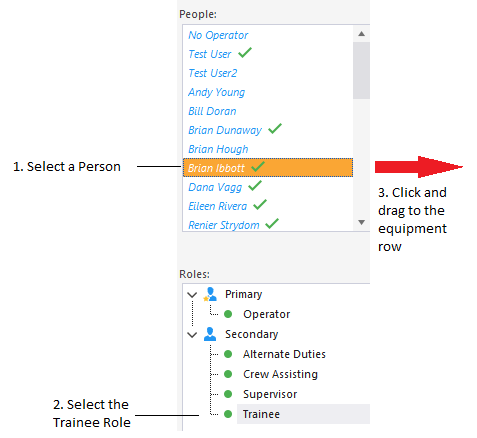
- Select a Person from the People pane.
- Select the Trainee Role from the Roles pane.
A tick will appear next to the name of the people who are qualified for that role.
- Drag and drop the person's name onto the appropriate Equipment row.
The person/trainee allocation will be displayed for that equipment:

The trainee allocation will only be displayed when you allocate an operator to the equipment.
If the person you are allocating is already assigned to another unit of equipment, he or she will no longer be allocated to that equipment.
You can also allocate a trainee to equipment directly from the People pane using the right-click menu: