Automatic equipment status changes
An equipment or location status change is often tied to another event, such as the allocation of equipment to a location, or the entering of a measure.
Sometimes, changing the status of a primary equipment unit will affect the status of a secondary unit. If a carrier breaks down, for example, all attachments assigned to that carrier become non-operational.
To reduce the amount of data entry for Data Acquisition and Mobile operators, rules can be established to automatically change the status of equipment and locations as events occur during the shift.
Status Selection Mode
How the status is changed when a status change event is triggered, will depend on the chosen Status Selection mode. Modes are configurable per site. Typically, there are three modes:
Automatic - no prompt
If the mode is set to automatic - No prompt. The rule will define a single status which will automatically be set with no user interaction.
Automatic - prompt
If the mode is set to automatic – Prompt then a single status will be defined. A Yes/No message box will ask the user whether they want the defined status to be set.
Note: Location Measure rules also support an Automatic - Conditional Prompt mode.
Automatic - Conditional Prompt
Automatic - Conditional prompt mode works the same as the Automatic - prompt mode, except that the message prompt is displayed only if the condition is satisfied (See Location Measure Rules).
Manual
If the mode is set to manual selection, a list of states will be presented to the user. The user will have the option to cancel the selection and therefore not change the status.
Equipment Status Rules
Rules that govern how equipment status changes will be triggered during the shift, are configured in an Equipment Status Rules reference group in the Pitram Portal.
To create a new rule:
- Select and check out an Equipment Status Rule reference table - for example, the EntryOfMeasureAgainstEquipER table.
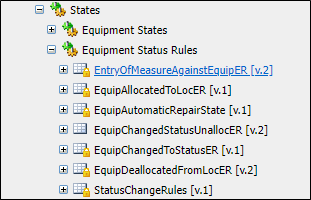
- Click the New Rule button.

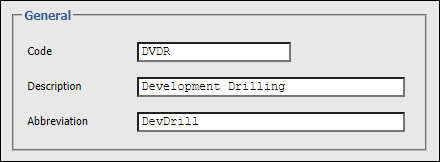
- Enter a unique code, a description, and an abbreviation for the rule.
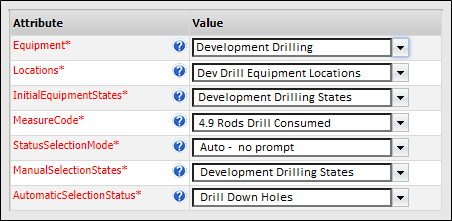
- Enter the required parameters of the rule. The parameters required will vary depending on the rule.
The following rules can be configured in order to trigger an equipment status change:
Entry of Measure Against Equipment
This applies to a single piece of equipment. When a measure is entered against the equipment, it signals the end of an activity.
- Select the equipment to which the rule applies.
- Select the locations to which the rule applies.
- Select the equipment states that the equipment can be in prior to the rule being applied.
For example, the rule will only be applied when the equipment is operating. In most cases, however, this setting will be set to 'All States'.
- Select the Measure Code for the measure that triggers the status change.
- Select the Status Selection mode to be applied when the status change is triggered.
- Select the Manual Selection states from a list of valid states. These are the states that can be selected manually be an operator when the Status Selection mode is set to Manual.
- Select the Automatic Selection status from a list of valid states. This is the status that the equipment will be set to when the Status Selection mode is set to Automatic.
For example, a dispatcher is prompted for a list of idle states when a ProductionMetres measure is entered against a Jumbo.
Equipment Allocated to / De-allocated from a Location
The following parameters must be set when creating a rule for either equipment allocated to a location, or for equipment de-allocated from a location:
- Select the equipment to which the rule applies.
- Select the locations to which the rule applies.
- Select the equipment states that the equipment can be in prior to the rule being applied.
For example, the rule will only be applied when the equipment is operating. In most cases, however, this setting will be set to 'All States'.
- Select the Status Selection mode to be applied when the status change is triggered.
- Select the Manual Selection states from a list of valid states. These are the states that can be selected manually be an operator when the Status Selection mode is set to Manual.
- Select the Automatic Selection status from a list of valid states. This is the status that the equipment will be set to when the Status Selection mode is set to Automatic.
For example, when a bogger is allocated to a mining face, its status is set to Operating. Or when a bogger leaves a mining face, its status is set to “Relocating”.
Equipment Changed To a Status
This rule applies specifically to events that change the status of an equipment unit that has secondary equipment units allocated to it.
- Select the primary equipment to which the rule applies.
- Select the secondary equipment to which the rule applies.
- Select the locations to which the rule applies.
- Select the equipment states that the primary equipment can be in prior to the rule being applied.
For example, the rule will only be applied when the equipment is operating. In most cases, however, this setting will be set to 'All States'.
- Select the Status Selection mode to be applied when the status change is triggered.
- Select the Manual Selection states from a list of valid states. These are the states that can be selected manually be an operator when the Status Selection mode is set to Manual.
- Select the Automatic Selection status from a list of valid states. This is the status that the secondary equipment will be set to when the Status Selection mode is set to Automatic.
If a Carrier breaks down, for example, any attachments allocated to the carrier are set to 'Idle".