Dispatch Analysis Tool
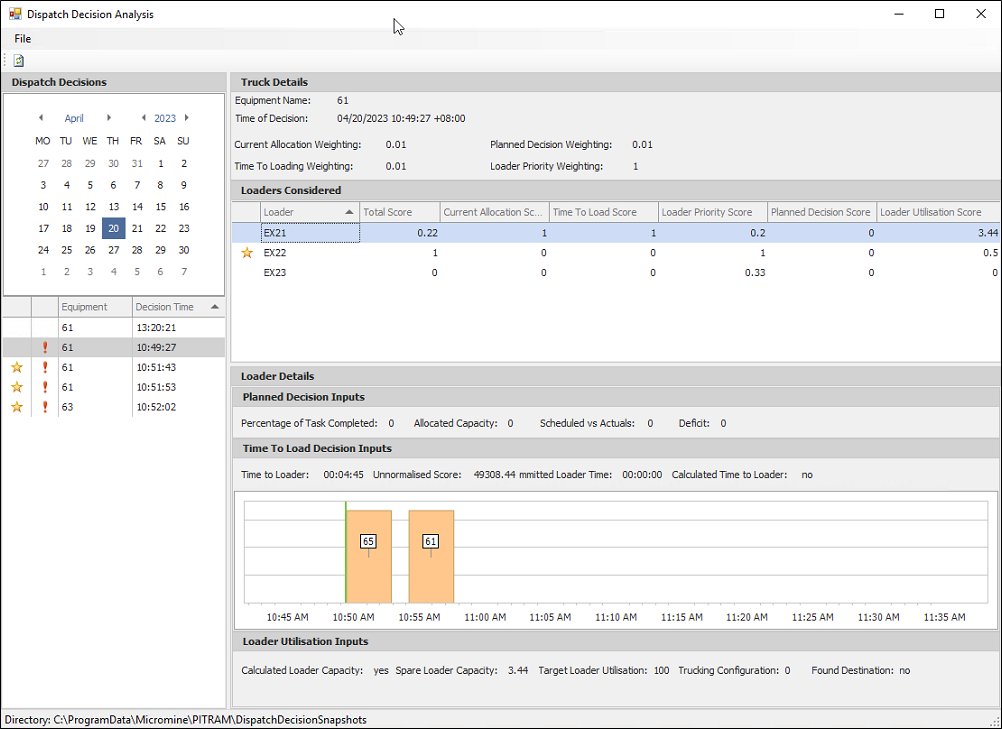
The Tools | Dispatch Analysis Tool option opens the Dispatch Decision Analysis tool which displays information on the dispatch decisions for trucks and loaders on a selected date.
Use the File menu to select whether Pitram should look for dispatch decision snapshots in the default folder location [C:ProgramData\MICROMINE\Pitram] or a custom location that you can select.
The Refresh button in the toolbar will load the relevant snapshot for the selected date if the snapshot folder location has been changed.
Dispatch Decisions
The Dispatch Decisions panel at the left contains a calendar that is used to select a date for which you want to display dispatch decisions in the analysis dialog.
The dispatch decisions for the selected date will appear as a list in the panel below the calendar.
Truck Details
The Truck Details panel at the right displays information on the Truck for the selected decision. The following information is displayed:
-
Equipment Name - The name of the Truck for the decision.
-
Time of Decision - The date and time at which the decision occurred.
-
Current Allocation Weighting - The current allocation weighting for the selected decision.
-
Planned Decision Weighting - The planned decision weighting for the selected decision.
-
Time to Loading Weighting - The time to loading weighting for the selected decision.
-
Loader Priority Weighting - The loader priority weighting for the selected decision.
Loaders Considered
The Loaders Considered grid displays the Loaders active list for the selected decision. Information on each loader is displayed in the columns of the grid, including the various Allocation, Decision, Priority and Utilisation scores and a Total Score for a loader.
Loader Details
The Loader Details panel displays information on the loader selected in the Loaders Considered grid.
Planned Decision Inputs
The Planned Decision Inputs panel displays information on the planned decision component of the selected decision. The information displayed includes the Percentage of Task Complete, the Allocated Capacity, Scheduled vs Actuals and Deficit.
Time To Load Decision Inputs
The Time To Load Decision Inputs panel displays a graph of the time to loader decisions by 5 minute increments. The Time to Loader, Unormalised Score, Committed Loader Time and Calculated Time to Loader values are displayed above the graph.
Loader Utilisation Inputs
In the Loader Utilisation Inputs panel, information on loader utilisation is displayed. Calculated Loader Capacity, Spare Loader Capacity, Target Loader Utilisation, Trucking Configuration and Found Destination values are displayed.