Permissions
Permissions allow you to control who has access to the files and folders in your Nexus workspaces and projects. Owner, Write and Read privileges can be set for individual users or user groups.
To set access permissions for the current workspace:
-
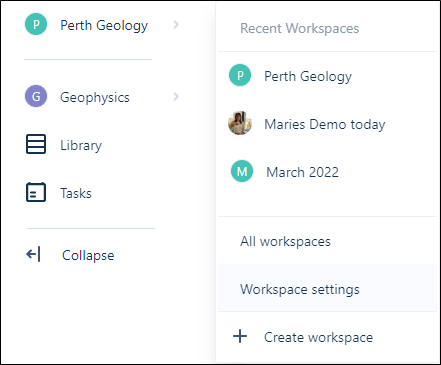
On the Navigation menu, click on <the name of the current workspace>.
-
Select Workspace Settings.
-
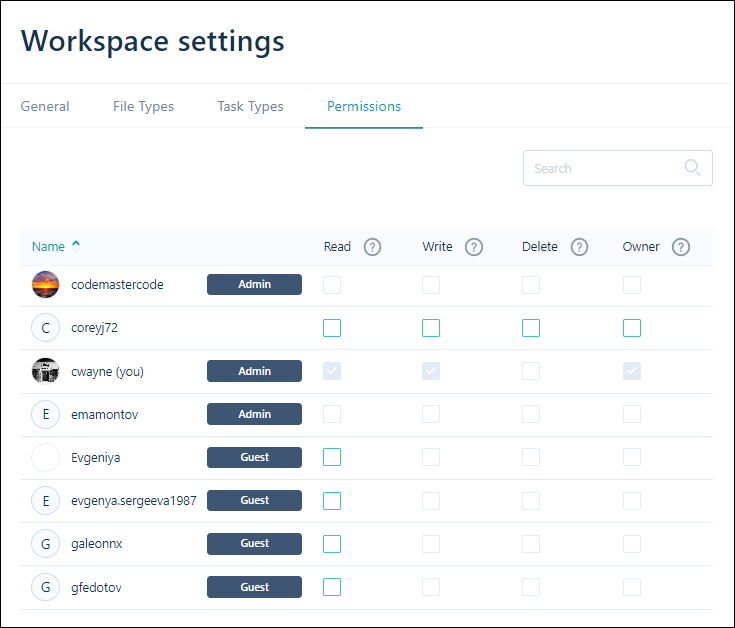
Click the Permissions tab to view access permissions for the workspace.
-
Use the Read, Write, Delete and Owner check boxes to set appropriate permissions for each user or user group:
Save
Click Save to save your changes.
Note: To Invite Users, or Create User Groups, you must have administrator privileges.