Distance to Wireframe

There are two basic input requirements in the Distance from Points to Wireframe form:
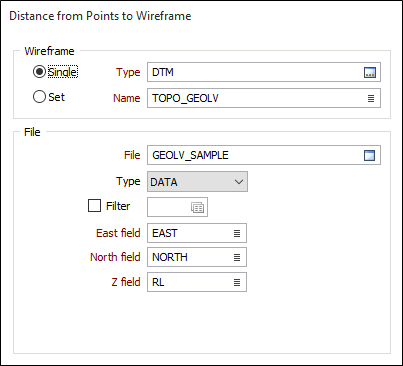
- A wireframe or a wireframe set
- A data file containing point coordinates
Wireframe
To process multiple wireframes in a wireframe set, select the Set option. When you create or edit a wireframe set, you can specify wireframes of several types. Wildcards and partial names may be used to select multiple wireframes for each type.
To process a single wireframe, select the Single option, select the type of the wireframe, and then the name of a wireframe of that type. Wildcards and a partial name in the Name input box may be used to select multiple wireframes. This will load the wireframe as if it were a wireframe set.
Note that wildcards in the Name input box will only be considered as a valid set definition if the name does not already exist. In other words, it is possible for a wireframe name to contain a wildcard character, for example “+”.
See: Wildcards
File
Double-click to select the name of the Data file containing the points you want to calculate the distance from. Optionally apply a Filter to restrict the process to a subset of the data in the file.
East and North and Z fields
Specify the names of the fields in which Easting, Northing, and Z coordinates are stored in the Data file.
Attributes to Assign
Clear target and Overwrite target fields
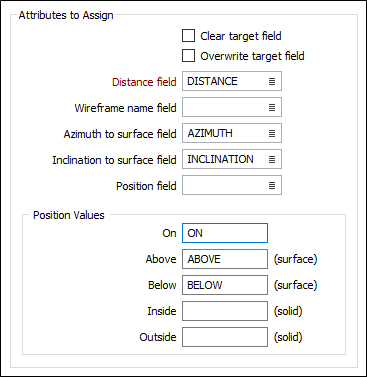
Select Clear target field and Overwrite target field according to how you want to deal with values already in the fields of the target file (the file to which you will assign wireframe attributes). For more information, refer to the Clear target field and Overwrite target field topic.
Distance field
Double-click to select the name of the field to which the calculated distances will be written. The function will write negative distance values to that field when points are either inside a solid or below a surface. See Position Values (below).
Wireframe name field
(Optional) It may be useful to identify which wireframes the point distances have been calculated for. Double-click to select a field that will be used to store the Wireframe Name attributes.
Azimuth and Inclination to Surface fields
(Optional) Azimuth and Inclination values need to be calculated in order to calculate the distance from each point to the surface. If Azimuth and Inclination fields are specified, you can record this information.
Position field
(Optional) If a Position field is specified, you can record an indication of the relative position of each point.
Irrespective of whether values are stored in a Position field or not, the function will write negative distance values to that field when points are either inside a solid or below a surface. This allows values to be used in graphs to compare soft and hard boundaries, for example.
Position Values
If you have specified a Position field, enter the values that will be used to indicate the relative position of each point in relation to a solid (On, Inside, Outside) or a surface (On, Above, Below).
Note that points falling outside the plan view silhouette of a surface will have a blank position value.
Forms
Click the Forms button to select and open a saved form set, or if a form set has been loaded, save the current form set.
Run
When you have specified inputs and outputs, click Run to begin the process.