Application
This
 System
Repeat Last Command
A new keyboard shortcut (F9) or a Vizex hotkey (ENTER) can be used to repeat the most recently run menu command.
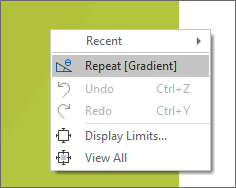
You can also select a Repeat option which sits below the list of Recent commands on the Vizex right-click menu.:
A Repeat option may also be enabled via the Quick Access Toolbar menu.
Command Search
When the option to display a Command Search box in the user interface is selected as part of your System options, the default position of the search box is now centred in the title bar of the application window.
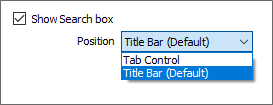
If you prefer, you can still choose an option to make the command search available as a tab on the application ribbon.
Ribbon User Interface
Improvements have been made to the location of tools on the File ribbon. The Create group is now replaced by a Data File group. The Edit Files group is now replaced by an Actions group. Some options have been relocated to a new Project group.
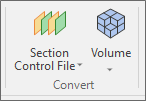
A separate Convert group has been added for Section Control File and Volume conversions:
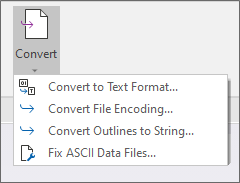
Data File conversions are available on the File tab, in the Actions group:
Windows Compatibility
Micromine Origin & Beyond makes use of the latest Windows features and these have allowed us to make significant performance improvements. For compatibility and future extensibility, Microsoft Windows 7 and Microsoft Windows Server 2008R2 are no longer supported.
Note that for Nexus integration support, Windows 10 (build 1809) or later is required.
Extensible Project File Format
A new and more extensible Micromine Origin & Beyond (.mmproj) project file format now replaces the .PRO file format used in previous versions. Project files are now stored in a Projects sub folder of the User Profile Folder.
Existing form sets will be upgraded automatically.
Gurobi 9.5 Support
Support for Gurobi 9.5 has been added.
The application provides an interface to a well-recognised commercial solver, Gurobi. To use this, you will either need a Gurobi licence, or you will need to purchase time from the Gurobi cloud service.
If Gurobi 9.5 is installed, an option will appear in the Gurobi selection switch in the Planner and Stope Optimiser.
Pitram Integration
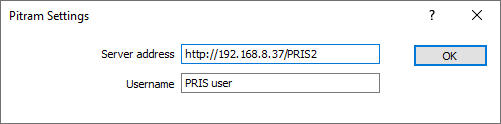
Micromine Origin & Beyond integration with Pitram via its Pitram 3D module has been re-factored to use PRIS (Pitram RESTful Integration Services).
To connect the application to Pitram:
-
Click the Project tab to open the backstage menu.
-
Select Options | Pitram Settings.
Nexus Integration
A new File | Nexus | Switch User option allows you sign out of Nexus and accept credentials for a different user.
Application responsiveness during preparation of files for Nexus Upload and the upload speed itself have been improved
Symbology
Text Assign Frequency
The Frequency column has been added to the Assign form for Text Colour Sets and Text Hatch Sets. The column lists the count of instances where the colour/hatch set has been assigned. This is useful in determining the most commonly used sets.
Text Colour Set Colour Ramp
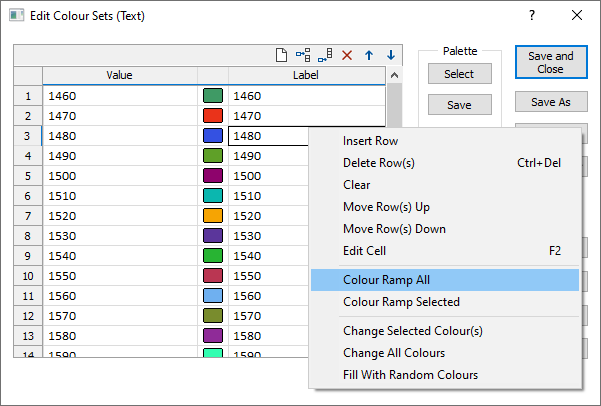
A Colour Ramp button has been added to the Text Colour Set form to allow the update of the colour ramp for selected rows. Additionally, new Colour ramp options have been added to the right-click menu for the colour set grid.
Hatch Set & Colour Set Conversion
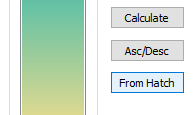
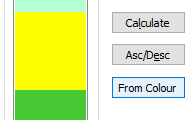
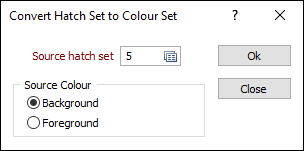
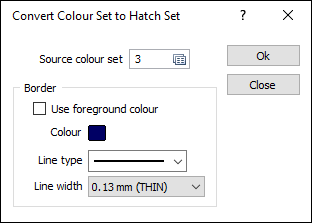
The ability to convert to and from Hatch Set to Colour Set has been added to the Edit Colour Set and Edit Hatch Set forms. This enhancement provides a simple method of creating a colour set from a hatch set, and vice versa, at the click of a button:
Numeric Sets: Assign
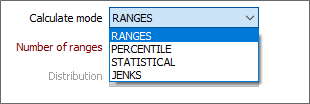
The JENKS calculation option in the Assign dialog now uses a K-Means algorithm which is already implemented elsewhere in the application. As a result, the performance of the assign is significantly improved for large files.
Text Sets
The performance of lookups for large (colour, hatch, symbol or line) text sets has been significantly improved.
The performance of a colour text set assign on large wireframe sets has also been improved.