Block Modelling
This
 Estimation
Block Model Volume Calculations
The processing speed of block model volume calculations has been significantly improved for functions which generate grades and/or tonnage reserves for wireframes by interrogating a block model.
Overwrite/Clear Target Fields
Overwrite Target Field and Clear Target Field options have been added to the Block Model | Estimation methods - Inverse Distance Weighting, Kriging, Rank Kriging and Multiple Indicator Kriging.
-
The Overwrite Target Field option, when selected, indicates that existing values in the target fields can be overwritten with new data when creating a block model.
-
The Clear Target Field option, when selected, will clear the existing values of any target fields when creating the block model.
Display
Volume Weighted & Mass Weighted Averages
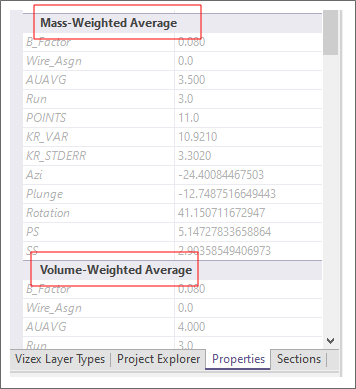
Volume-weighted averages are now shown in the Vizex Properties tab when multiple blocks are selected.
A Density field input has also been added to the Input tab of the Display | Block Model form. This allows the grades of the blocks to be expressed as mass-weighted grades (e.g. g/t).
If Density values are available, a Mass weighted average block of properties is also shown in the Vizex Properties tab:
Edit Block Model
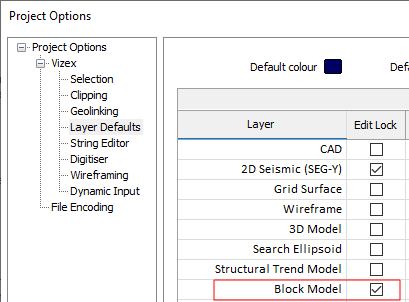
On the Layer Defaults tab of the Project > Vizex Options form, block model layers are now editable by default: