Smooth (form)

You can also select a Smooth option to smooth one or more selected strings, or segments, in Vizex. See: Smooth String.
The Smooth form function fits a B-spline curve to the original data in a file containing string information and generates a set of points that define the curve, writing these to an output file. A typical operation results in about six new points for every original point.
You can control how closely the curve fits the original data via a 'tension' parameter. The first and last points of the string will be unchanged, but it is unlikely that the exact values of any of the original intermediate points will appear in the output file even when the maximum tension is used.
It may be useful to simplify the resultant file to reduce the number of points, and perhaps smooth it again if required.
Set the following parameters in the String Smoothing form:
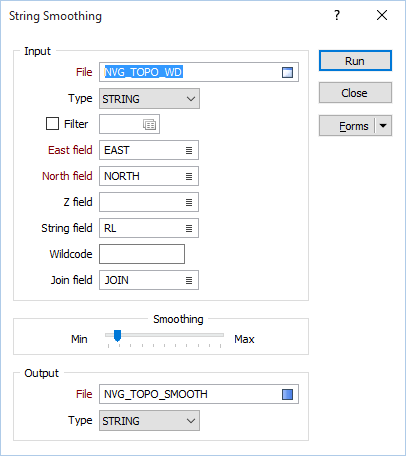
File
Choose an Input file type and enter or double-click (F3) to select the name of the Input file.
East, North, Z
Enter the East and North field names. If you include a Z field, the output file contains an approximate linear interpolation for this variable.
String field
Specify the name of the field containing values that define whether data points will be joined by a line. The values of this field in successive records must be the same before the points will be strung.
Wildcode
Enter the value (usually characters) in the String field that will force a line to be drawn to both the previous and the next point. The linetype will be that of the previous or next point. A wildcode used to join CREST and Toe strings might be CT.
Join field
Specify the name of the field that will contain values that define whether data points will be joined by a line i.e. strung. If successive records have the same value in this field and no String field is defined, a line will join the points. If a String field is defined, then values in each field in successive records must be the same before the points will be strung.
Smoothing
Use the slider control to apply the degree of smoothing.
Output file
Choose an Output file type and enter (or double-click / F3 to select) the name of the Output file. Output field names are taken from the Input file.
Forms
Click the Forms button to select and open a saved form set, or if a form set has been loaded, save the current form set.
Manage
To save the types, attributes and names you have defined and re-use them in other functions, select Manage button to create a form set or load an existing form set.
Save
Click Save to save your changes as the default form set.
Save As
Click Save As to save your changes as a new form set.
Reset
Click Reset to clear the form of all values and reset the form to its default state.
Run
Finally, click the Run button to run the function. A message will indicate the progress of the smoothing.