Optimise

The Gantt window must have focus for this menu item to be enabled.
The objective is to maximise discounted metal production. A task attribute and Discount rate are used to define the objectives. The “Discount Rate Per Period” grid list allows the discount rate to change over time.
Typically the Objective Attribute will be an expression such as [Grade]*[Ore Tonnes], to define Metal. The expression might be more complicated. Perhaps including variable recovery rates and grade equivalents. The discount rate is a reflection of risk aversion.
The stage, horizontal and vertical dependencies are rules that must be adhered to by the solver. Additional constraints have more flexibility – the optimiser attempts to comply. These constraints can be divided into two types:
- Capacity constraints (per period). Examples are:
- Mining capacity – maximum amount of rock which can be mined in one period.
- Processing capacity - maximum amount of ore that can be handled by the processing plant in one period 2.
- Grade constraints:
- The minimum and maximum (weighted average) grade per period.
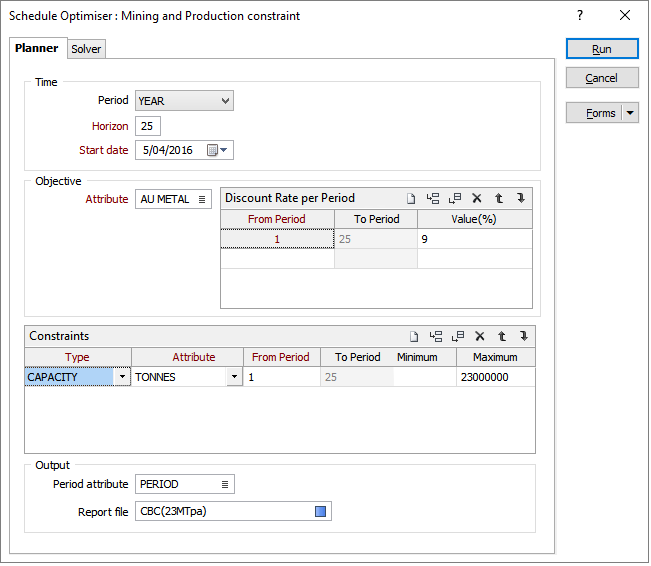
The simplest scenario is shown in the screenshot below. The objective is to maximize the NPV of Au Metal with a discount rate 9%. The mining capacity is 23MT per year and the time horizon is 25 years.
The Period attribute will be populated by the optimisation process. Each period will contain only complete blocks. In other words there is no consideration for a block to be partially mined at the end of one period with mining completed in the following period.
The simplest scenario is shown in the screenshot below:
Run the solver. It is not possible to predict how long the optimisation will take. There will be multiple iterations, each iteration attempts to improve the solution optimality (although this is not always the case). When an iteration is complete, its optimality will be reported in the progress bar.
Output
When the optimisation has finished the results are written to a Report file.
In addition, the Tasks Mining Period attribute will be populated, and a Start and Finish date will be calculated. Note that these date indicate a possible mining sequence (based on the Period and the horizontal and vertical dependencies) not an optimal sequence. What has been optimised, based on the objectives, dependencies and constraints provided, is which blocks should be mined in which period. By providing a possible sequence, the tasks can be animated to give an indication of what will have been mined at any future date. If the animation “step” matches the period, then you will visualise an optimal mining sequence.
The following OBJECTIVE attributes are written to the Report file:
| OBJECTIVE(NPV) | |
| OBJECTIVE(NPV)+ | Cumulative |
| OBJECTIVE(Raw) | |
| OBJECTIVE(Raw)+ | Cumulative |
Other attributes are reported if they are NUMERIC and have a selected calculation type (Sum, Mean, etc). If an attribute has multiple calculation types selected, then it will be reported multiple times with the "type" appended to the attribute name.