Options
The Options tab of the Block Model Report form allows you to apply a block factor when processing the blocks in the file.
Block factors record the portion of each block inside a constraint such as a wireframe. When reporting estimates for block models that have been constrained and contain block factors, you can use the block factors to control the volume and tonnage that is reported.
You can calculate block factors using the Wireframe Assign function (or calculate them on-the-fly here).
To define the volumes of blocks between two sets of constraints, you can derive block factors from other block factors. For example, you can calculate the portion of each block inside each of the two constraints, orebody and pit, to report the volume of material inside the orebody and inside the pit.
Using the Calculate function (on the File tab, in the Edit Data group) you can then calculate a new block factor which correctly determines the volumes of blocks between the two sets of constraints.
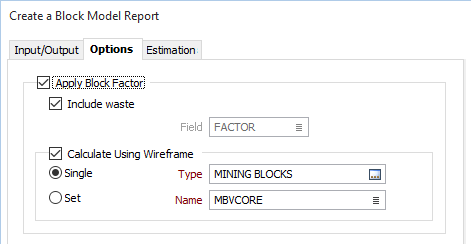
Apply block factor
Select the Apply block factor check box to calculate block factors on-the-fly or select the field that contains the values for the portion of each block in the wireframe. When reporting estimates for block models that have been constrained and contain block factors, you can use the block factors to control the volume and tonnage that is reported.
Block factors record the portion of each block inside a constraint such as an outline or wireframe. When reporting estimates for block models that have been constrained and contain block factors, you can use the block factors to control the volume and tonnage that is reported.
Include waste
Select the Include waste checkbox to apply a factor of (1 - factor) to the volume. This will add another column to the report called WASTE, whose values can be either True or False, and in the case of a Standard report, Total.
The report will be sorted so that the WASTE = False records are written before the WASTE = True records.
Field
If the Calculate option is not selected, double-click (F3) to select the field that contains the factor values.
Calculate Using Wireframe
Alternatively, select the Calculate check box option and select the wireframe or the wireframe set that will be used to calculate block factors on-the-fly.
Report Categories
Select the Categorisation check box if you want to use one or more fields, the names of which must be specified in the Category fields list box, to categorise the reported grade estimates. For example, you might want to report estimates according to Material and then by Classification.
Use the buttons on the grid list toolbar to Manage the rows in the list.
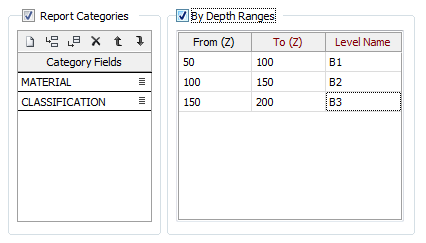
By Depth Ranges
Select this option when you want to define ranges in the report using a set of From-To RL ranges and assign a Code value to each range. The From-To intervals must not overlap; however the To value of one interval can be a lower value than the From value of the next interval.