Spatial Database Settings
You can import data from a Microsoft SQL Server spatial database (Microsoft SQL Server 2008 and later) by entering the parameters needed to build a valid MSSQL connection string.
"MSSQL:server=<server_name>\<server_name>;database=<Database>;tables=<schema>.<table>(<column name>);trusted_connection=yes"
Server
Specify the name of the server where the database you are connecting to is stored.
Database
Specify the name of a database located on the server.
Tables
If the table field is left blank, all spatial tables in the database are included.
If a table and a schema name are specified, then a column name must also be specified.
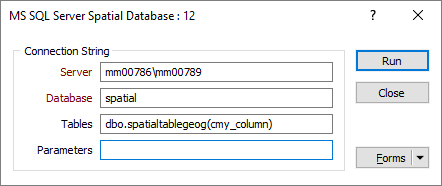
Parameters
Extra parameters may be specified in addition to the standard parameters of the connection string. A working knowledge of SQL Server connection strings is assumed.
For more information, refer to: http://www.gdal.org/ogr/drv_mssqlspatial.html
WKB (Well Known Binary) geometry format is only supported in SQL Server 2012 and later.
 See Also