Sample Tag Qualifiers
In Sample Tracker, each individual sample submitted to the laboratory for analysis must be given a unique sample tag. When results are received from the laboratory, this sample tag is used to link the analytical results to the original (despatched) sample.
By default, Sample Tracker assumes that any result is uniquely identified by a combination of despatch number, sample tag, method and element. In other words, a SIF file would normally contain only one record per sample tag. However, there are special cases where the laboratory may generate more than one analytical result (per combo) for the same sample tag. In such cases, it becomes necessary to use sample tag qualifiers to uniquely identify the result.
A sample tag qualifier can be any alphanumeric string, representing a specific component or a sample subset. Examples of tag qualifiers are:
- grain number and probe type in SEM data (diamonds)
- size fractions and wash fractions in coal washability data.
When tag qualifiers are used, the input data file (SIF or CSV) may contain multiple entries for the same sample tag, each made unique by the addition of one or more sample tag qualifiers. The values for all the tag qualifiers must be supplied on each individual data record in the input file, for example, TAG_QLF1, TAG_QLF2,….
Any number of tag qualifiers may be added to the format definition, provided that they all appear in the data section (i.e. on the same row as the SAMPLEID field).
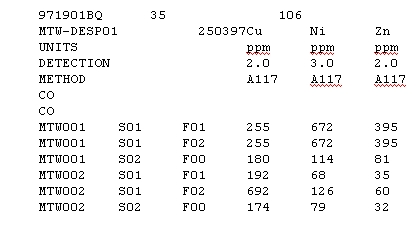
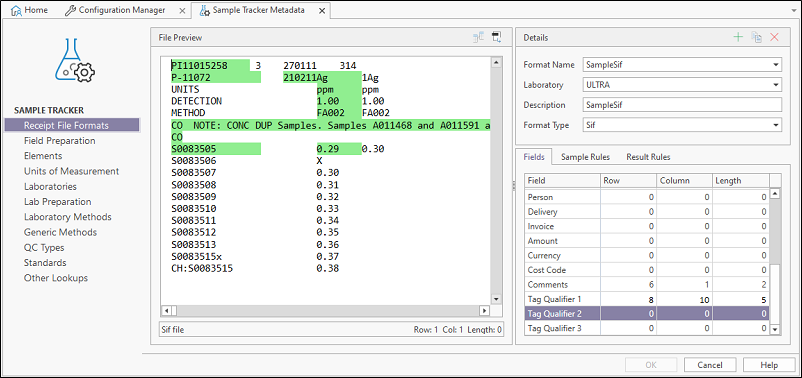
The following example shows part of a standard SIF file, with two tag qualifiers fitted in between the sample tag and the first result field:
The corresponding format definition (as it appears in the ST_XS_FORMAT_LAYOUT table) is shown below:
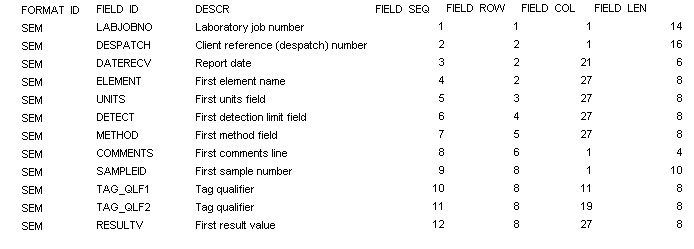
In this case, two additional values will be stored in the ST_RESULT table (or ST_RESULT_STANDARD if appropriate). Sample Tracker assumes that the column name in the database table is the same as the FIELD_ID value of the corresponding tag qualifier, as stored in the format definition (i.e. TAG_QLF1 and TAG_QLF2 in this case).
By default, the result table in the Sample Tracker database does not make provision for sample tag qualifiers. The structure of the ST_RESULT table (and the ST_RESULT_STANDARD table, if appropriate) must therefore be altered to include the tag qualifiers as primary key columns.
This highlights one of the problems arising from the use of sample tags: null values are not allowed in primary keys, therefore tag qualifiers must always have a value. However, sample tags are not necessarily used for all commodities; therefore it is unlikely that all SIF files processed by an organisation will contain tag qualifiers.
To prevent this problem, you have to ensure that tag qualifiers are always populated. This can be accomplished by using default values.
Using default values
Default values can be defined as part of the format layout. This is done by following a very special rule:
If the FIELD_ROW value for a given field is greater than zero, but the value for FIELD_COL is zero, then Sample Tracker will always return a default text value for that field. This default value is retrieved from the corresponding SHEET_ID field in the format definition.
By using this technique, you can ensure that required fields will always have a value, even if the value does not appear in the input file. For example, if you are working with a database that has been configured for sample tag qualifiers, but need to process files that do not contain qualifiers, then you can set up a format definition that will return a default value (e.g. "NA") for each of the tag qualifiers.
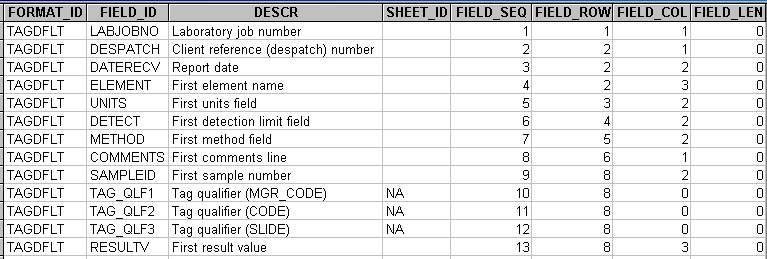
The following example shows a format definition for a CSV file which does not contain the required tag qualifier fields. Note that the row number is the same as that of the sample number field, to identify the tag qualifiers as part of the data section.
Limitations when using tag qualifiers
Tag qualifiers were introduced to work around the problem of linking multiple sets of analyses to the same original sample tag. This is done by extending the primary keys of the ST_RESULT and ST_RESULT_STANDARD tables and using the TAG_QLF convention for certain data fields in order to enable Sample Tracker to store the results.
Changing the database to support tag qualifiers
This example query adds a single tag qualifier include in the PK for Result and result standard:
ALTER TABLE ST_RESULT ADD [TAG_QLF1] NVARCHAR(30) not null DEFAULT 'FULL'

ALTER TABLE ST_RESULT_STANDARD ADD [TAG_QLF1] NVARCHAR(30) not null DEFAULT  'FULL'

/****** Object:  Index [ST_RESULT_PK]    Script Date: 9/5/2016 11:42:11 AM ******/
ALTER TABLE [dbo].[ST_RESULT] DROP CONSTRAINT [ST_RESULT_PK]
GO

/****** Object:  Index [ST_RESULT_PK]    Script Date: 9/5/2016 11:42:11 AM ******/
ALTER TABLE [dbo].[ST_RESULT] ADD  CONSTRAINT [ST_RESULT_PK] PRIMARY KEY CLUSTERED
(
	[DESPATCH_ID] ASC,
	[SAMPLE_TAG] ASC,
	[TAG_QLF1] ASC,
	[LAB_METHOD] ASC,
	[LAB_ELEMENT] ASC
)  ON [PRIMARY]
GO


/****** Object:  Index [ST_RESULT_STANDARD_PK]    Script Date: 9/5/2016 11:50:33 AM ******/
ALTER TABLE [dbo].[ST_RESULT_STANDARD] DROP CONSTRAINT [ST_RESULT_STANDARD_PK]
GO

/****** Object:  Index [ST_RESULT_STANDARD_PK]    Script Date: 9/5/2016 11:50:33 AM ******/
ALTER TABLE [dbo].[ST_RESULT_STANDARD] ADD  CONSTRAINT [ST_RESULT_STANDARD_PK] PRIMARY KEY CLUSTERED
(
	[DESPATCH_ID] ASC,
	[SAMPLE_TAG] ASC,
	[TAG_QLF1] ASC,
	[LAB_METHOD] ASC,
	[LAB_ELEMENT] ASC
) ON [PRIMARY]
GO
Adding tag qualifiers to fields in the database
INSERT INTO [GB].[ST_FILE_FORMAT_FIELD]
           ([FIELD_ID]
           ,[RESOURCE_NAME]
           ,[IS_REQUIRED]
           ,[ORDER_NO]
           ,[DATA_SOURCE])
     VALUES
           ('TAG_QLF1'
           ,'TAG_QLF1'
           ,0
           ,20
           ,'User')
Setting up a file format with tag qualifiers defined
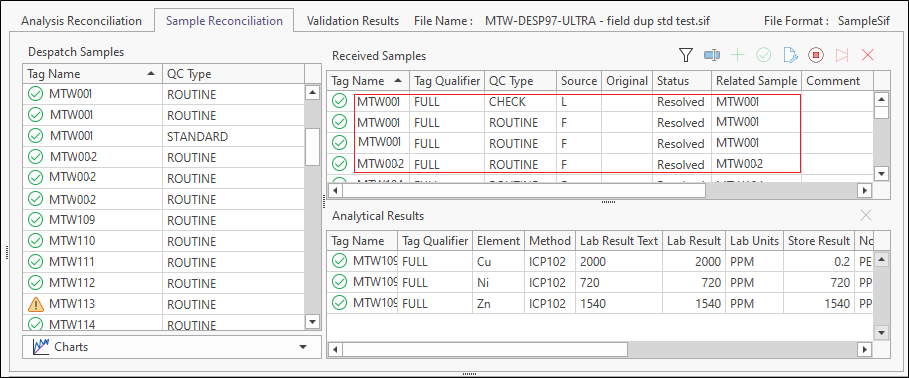
The second and third occurrences of samples MTW001 and MTW002 are resolved as tag qualified results: