Runtime Options
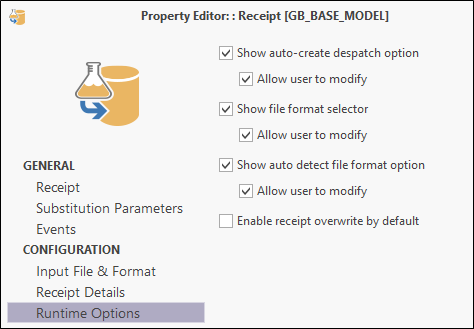
The Runtime Options page provides advanced configuration options. You can hide or show check boxes that allow:
- a despatch to be auto-created
- the user to select a file format
- the auto-detect file format option to be turned on and off
- receipts to be overwritten by default
To make a receipt result unique when the lab job number is the same, you can give each result a unique (Preliminary 1, Preliminary 2, or Final) receipt status:
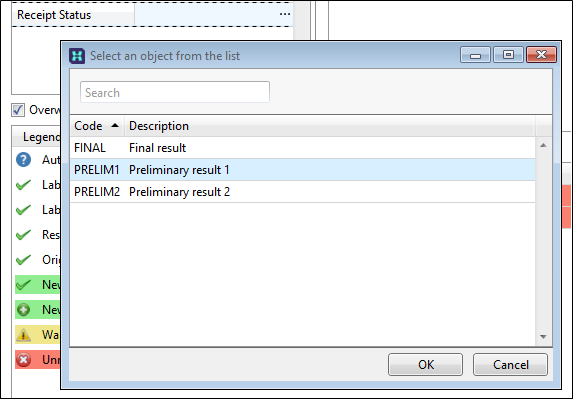
These status lookup codes are setup in Metadata:
Duplicate headers are detected during the processing of a receipt. A second occurrence of Zn, for example, which has been included in an assay results file, but without the proper naming convention Zn1, is treated as a lab repeat.
Auto despatch
If a manual despatch was not carried out and then you receipt the lab file without ‘auto-despatch' selected, the receipt opens with an empty 'Analyses Requested' pane. This is because a despatch was never created. A message in the pane states there are no requested analyses:
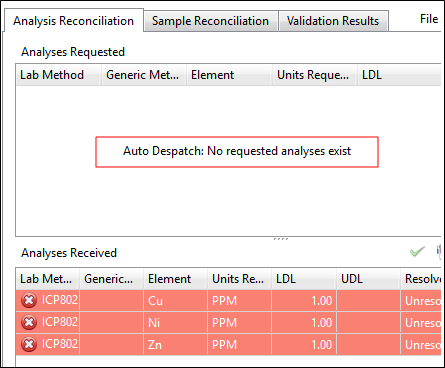
If this occurs cancel the receipt and run it again with ‘auto-despatch’ selected; or if the option is not available to you, manually process the despatch then run the receipt again.